
Samsung Wallet (Samsung Pay)
4.2star
1.14M reviews
100M+
Downloads

Everyone
info



About this app
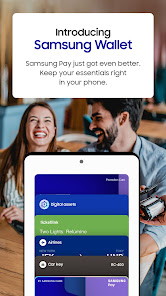
Samsung Pay got even better. Meet Samsung Wallet!
Samsung Pay is now part of Samsung Wallet. With Wallet, you get the features and benefits of Samsung Pay, plus Samsung Pass, digital home and car keys, digital asset management, and more.
All this comes in a simplified in-app experience, so you’ll get more and find it with ease. Just swipe up to launch Samsung Wallet with Quick Access.
Payment Transactions
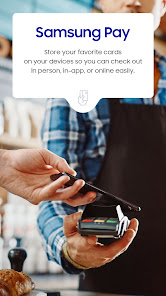
Carry your popular credit, debit, gift and membership cards on your phone. To check out, just tap, pay, and go. Get additional savings at top merchants with Cash Back Awards.
Digital Keys
Add your eligible keys to Samsung Wallet so that you have a spare set right in your phone.
Unlock your home, your car, and even start your car remotely.
Digital Asset Management
Check your crypto balances and the current crypto currency prices through our linked exchange partners.
Boarding Pass
Add your boarding pass from select airlines to Samsung Wallet and quickly access it with just a swipe.
*You may be prompted for additional updates to complete Samsung Wallet setup on your device.
*Samsung Wallet is compatible with select Samsung devices. Availability of features may vary by device model, carrier, firmware version and country/region.
*Screens are simulated; deals featured are for illustrative use only.
*Only compatible with select Visa, Mastercard, American Express, and Discover cards from participating banks and qualifying Samsung devices. Check with your bank/issuer to ensure that your card is compatible; and check the Samsung Pay Support page for additional compatibility information regarding devices, carriers and cards.
*The functions, features, and compatible applications available with Samsung Pass may vary according to the partner’s policy. The data stored inside the Samsung Pass app is safeguarded by Samsung Knox to prevent any leakage of valuable information.
*Digital keys are available for select SmartThings-compatible smart door locks and automobiles including BMW 1-8 Series, X5-X7,and iX models, launched after July, 2020, Kia Niro, and Hyundai Palisade, Genesis GV60, and G90. Exact feature availability may vary by model and is subject to change.
*Digital asset management for supported exchanges only.
*Timing and availability of features and services described may vary by model and are subject to change.
*This app may not be available depending on the region.
*Some features may not be available depending on the region.
Samsung Pay is now part of Samsung Wallet. With Wallet, you get the features and benefits of Samsung Pay, plus Samsung Pass, digital home and car keys, digital asset management, and more.
All this comes in a simplified in-app experience, so you’ll get more and find it with ease. Just swipe up to launch Samsung Wallet with Quick Access.
Payment Transactions
Carry your popular credit, debit, gift and membership cards on your phone. To check out, just tap, pay, and go. Get additional savings at top merchants with Cash Back Awards.
Digital Keys
Add your eligible keys to Samsung Wallet so that you have a spare set right in your phone.
Unlock your home, your car, and even start your car remotely.
Digital Asset Management
Check your crypto balances and the current crypto currency prices through our linked exchange partners.
Boarding Pass
Add your boarding pass from select airlines to Samsung Wallet and quickly access it with just a swipe.
*You may be prompted for additional updates to complete Samsung Wallet setup on your device.
*Samsung Wallet is compatible with select Samsung devices. Availability of features may vary by device model, carrier, firmware version and country/region.
*Screens are simulated; deals featured are for illustrative use only.
*Only compatible with select Visa, Mastercard, American Express, and Discover cards from participating banks and qualifying Samsung devices. Check with your bank/issuer to ensure that your card is compatible; and check the Samsung Pay Support page for additional compatibility information regarding devices, carriers and cards.
*The functions, features, and compatible applications available with Samsung Pass may vary according to the partner’s policy. The data stored inside the Samsung Pass app is safeguarded by Samsung Knox to prevent any leakage of valuable information.
*Digital keys are available for select SmartThings-compatible smart door locks and automobiles including BMW 1-8 Series, X5-X7,and iX models, launched after July, 2020, Kia Niro, and Hyundai Palisade, Genesis GV60, and G90. Exact feature availability may vary by model and is subject to change.
*Digital asset management for supported exchanges only.
*Timing and availability of features and services described may vary by model and are subject to change.
*This app may not be available depending on the region.
*Some features may not be available depending on the region.
Updated on
Safety starts with understanding how developers collect and share your data. Data privacy and security practices may vary based on your use, region, and age. The developer provided this information and may update it over time.

No data shared with third parties
Learn more about how developers declare sharing

No data collected
Learn more about how developers declare collection
Ratings and reviews
4.2
1.13M reviews

Sean Chase
- Flag inappropriate
July 21, 2024
This WAS a great and convenient app. Now, every time you use it, you have to pull out your cards, look up your CCV, plus whatever information it doesn't feel like filling in. There's really no point to it anymore. It's not convenient at all and really saves no time. Like so many other stupid decisions Samsung has made they last few years, this too makes owning and using their products less appealing with every iteration.
459 people found this review helpful

A Google user
- Flag inappropriate
- Show review history
March 16, 2019
The app is fine, but on occasion all cards randomly disappear. Also just learned points now expire a year from earning them. This is nowhere to be found in the "helpful" FAQ section. I stumbled across this when I pressed the reward icon in the app. Pretty tacky when you're earning a paltry 3 points per transaction unless you're buying tons of gift cards. Now it's a useless rewards program! I won't use anymore because the rewards suck, now you can't track my purchases Samsung. You lose!!
95 people found this review helpful
A Google user
- Flag inappropriate
October 9, 2018
It's awesome when it works, but the problem is, IT ONLY WORKS HALF OF THE TIME for me at best! It really has the potential to work just about anywhere, from a Five Below to Walmart to a run-down gas station convenience store. The problem is, I have had a number of problems with it in practice: 1) About half of the time, I get a "Card Read Error" or something to that effect, and the transaction does not go through at all. 2) Sometimes, the payment actually goes through, but I do not get points for the transaction, and the transaction doesn't even show in my Samsung Pay history. 3) I have had a problem before where I simply couldn't even try to make a payment with a card anymore. I would type in my pin or use the iris scanner, but then it would not do the 30-second countdown. It just instantly failed. I was able to solve this by deleting all of the app data on my phone, re-signing in, and manually re-adding and re-authenticating every payment method in the app. It was a pain in the butt, and there was no explanation for why it happened in the first place! I will also say, I've contacted Samsung several times about each of these problems, but their responses were unhelpful.
70 people found this review helpful
App support
About the developer


