Phone by Google
4.5star
46.8M reviews
5B+
Downloads

Everyone
info
About this app
Google’s official phone calling app is now available to download for the first time. Phone helps you easily connect with family and friends, block spam callers, and know who’s calling before you answer – all with a simple, intuitive design.
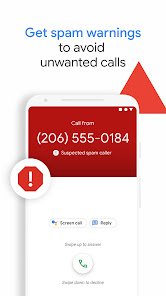
Powerful spam protection
See warnings about suspicious callers that help you avoid unwanted calls from spammers, telemarketers and scammers. Block numbers to prevent them from calling you again.
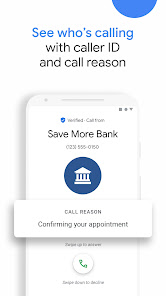
Know who’s calling you
Google’s extensive caller ID coverage lets you know the business that’s calling so that you can answer with confidence.
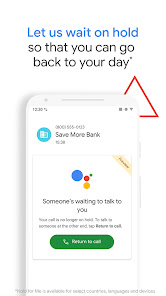
No more waiting on hold 1, 5
Hold for Me lets you go back to your day. If a business puts you on hold, Google Assistant can wait on the line for you and let you know when someone is ready to talk.
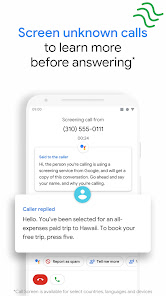
Screen unknown callers 1, 2
Call Screen answers unknown callers, filters out detected spammers without interrupting you, and helps you learn more about callers you don’t recognize before you pick up.
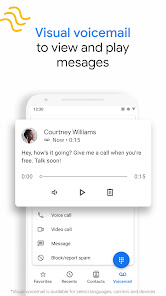
Visual voicemail 1, 3
Check your messages without needing to call your voicemail – view and play them in any order, read transcriptions, and delete or save them right from the app.
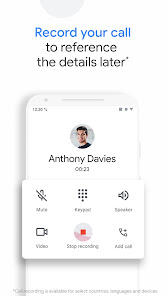
Call recording 1
Record your phone calls to capture important information for reference later. Everyone hears a disclosure when the recording starts so they’re aware, and recordings are saved on your phone.
Intuitive design
Our simple, lightweight design keeps your favorite people just a tap away. Plus, switch to dark mode to save battery and reduce eye strain at night.
Emergency support 1, 4
See your current location when you make an emergency call, and share information about the assistance you require, along with your location, to the emergency operator without speaking.
Phone app is available on most Android devices running Android™ 9.0 and above.
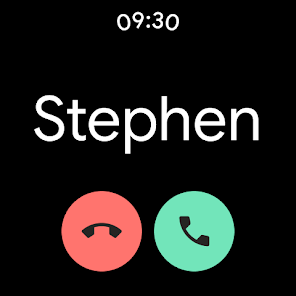
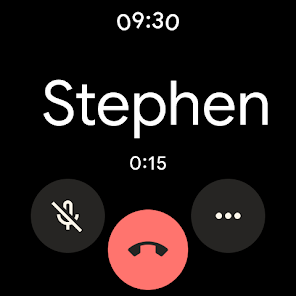
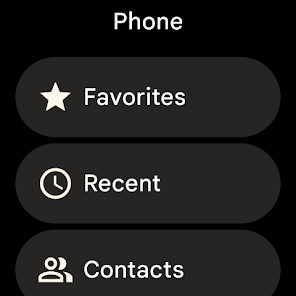
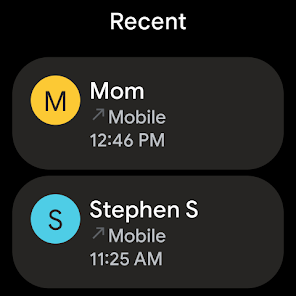
Also available for Wear OS.
1Available only on some devices that have Phone pre-installed.
2Manual screening is not available in all languages or countries. For more information, see g.co/help/callscreen. Automatic screening is available in the US only, English only. Call Screen may not detect all spam calls.
3Transcription is available in the US only, English only.
4Available in Australia, United Kingdom and the US only, English only.
5Available in the US only, English only. Pixel 2+ devices only. Toll-free numbers only. May not detect every on-hold scenario.
Powerful spam protection
See warnings about suspicious callers that help you avoid unwanted calls from spammers, telemarketers and scammers. Block numbers to prevent them from calling you again.
Know who’s calling you
Google’s extensive caller ID coverage lets you know the business that’s calling so that you can answer with confidence.
No more waiting on hold 1, 5
Hold for Me lets you go back to your day. If a business puts you on hold, Google Assistant can wait on the line for you and let you know when someone is ready to talk.
Screen unknown callers 1, 2
Call Screen answers unknown callers, filters out detected spammers without interrupting you, and helps you learn more about callers you don’t recognize before you pick up.
Visual voicemail 1, 3
Check your messages without needing to call your voicemail – view and play them in any order, read transcriptions, and delete or save them right from the app.
Call recording 1
Record your phone calls to capture important information for reference later. Everyone hears a disclosure when the recording starts so they’re aware, and recordings are saved on your phone.
Intuitive design
Our simple, lightweight design keeps your favorite people just a tap away. Plus, switch to dark mode to save battery and reduce eye strain at night.
Emergency support 1, 4
See your current location when you make an emergency call, and share information about the assistance you require, along with your location, to the emergency operator without speaking.
Phone app is available on most Android devices running Android™ 9.0 and above.
Also available for Wear OS.
1Available only on some devices that have Phone pre-installed.
2Manual screening is not available in all languages or countries. For more information, see g.co/help/callscreen. Automatic screening is available in the US only, English only. Call Screen may not detect all spam calls.
3Transcription is available in the US only, English only.
4Available in Australia, United Kingdom and the US only, English only.
5Available in the US only, English only. Pixel 2+ devices only. Toll-free numbers only. May not detect every on-hold scenario.
Updated on
Safety starts with understanding how developers collect and share your data. Data privacy and security practices may vary based on your use, region, and age. The developer provided this information and may update it over time.

No data shared with third parties
Learn more about how developers declare sharing

This app may collect these data types
Location, Personal info and 4 others

Data is encrypted in transit

Data can’t be deleted
Ratings and reviews
4.5
46.6M reviews

Belinda Blok
- Flag inappropriate
- Show review history
March 28, 2026
Having an issue with incoming calls. phone doesn't ring then I get a notification for missed call. It's a phone's most important function. I've checked every single setting in the app, in the account and cannot find the problem. I've cleared cache, I've uploaded the app. will my phone continue to work if I uninstall it? I didn't download it, it came with the phone.
1 person found this review helpful
Google LLC
March 28, 2026
Hi Belinda. You can change your phone’s call ringtone, vibration settings, quick responses, and call history display. Check this link for the steps: https://goo.gle/3c3txCV. Hope this helps.

L. P.
- Flag inappropriate
- Show review history
March 30, 2026
Could be a lot better. It's hard to hear people on speaker and cuts out when I get small airplanes flying over. Maybe T-mobile's Network as well. Also hangs up on some business calls when on hold for more than 5 minutes sometimes. Update. 3/20/26. I am still having these issues after trying suggested solutions. Today I was on with a company and the call disconnected. The problem is still there apparently. Update: March 29. I switched carriers and pretty much the same and worse. Interface sucks.
47 people found this review helpful
Google LLC
September 25, 2025
Hi there. We're sorry to hear that. The team is working hard to make the Phone app better over time. Please continue to help us improve by sending feedback within the Phone app through clicking the Menu button then the 'Help and Feedback' option and tapping on 'Send Feedback'. Thank you for letting us know.

Patrick McCrary
- Flag inappropriate
April 1, 2026
the app won't even let me open it to call people I really need to call. i click it to open it and it immediately kicks me out before I can get passes the loading part. I've literally looked up everything i possibly could and nothing is wrong. I've tried factory reset, clear storage, clear cache, force stop, and I've tried Google for solutions but it gives me all the stuff I've already started and it hasn't worked all day
Google LLC
April 2, 2026
Hi Patrick. We're sorry to hear that. Let's try fixing issues with the app by clicking this link: https://goo.gle/4leWgsg. Should you continue to have issues, submit feedback within the Phone app by clicking the Menu button then the "Support" tab and tap "Send Feedback".
What’s new
With our latest update to Call Screen on Pixel devices in the US, the Google Assistant now helps you automatically screen unknown callers and filter out detected robocalls before your phone ever rings. And when it’s not a robocall, your phone rings a few moments later with helpful context about who is calling and why.
App support
About the developer
Google LLC
1600 Amphitheatre Pkwy
Mountain View, CA 94043
United States
+1 650-253-0000


