WatchGlucose
3.0star
76 reviews
10K+
Downloads

Everyone
info



About this app
Keep your glucose levels in sight — right on your wrist! 🩸⌚
Monitoring your blood sugar shouldn't mean constantly pulling out your phone. With WatchGlucose, you can see your real-time levels and trends directly on your Wear OS watch (including Samsung Galaxy Watch, Google Pixel Watch, and more).
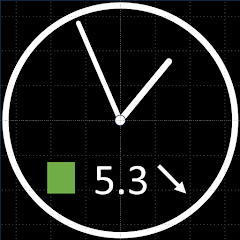
Why use WatchGlucose? • Glanceable Data: Use our complication providers to show your current glucose, trend arrows, and warning levels on your favorite watch face. • Custom Watch Faces: Choose between our dedicated Analog or Digital watch faces (available on Google Play) with customizable background and text colors. • 12-Hour History: Simply swipe left to view a dedicated Tile showing your glucose history over the last 12 hours. • Full Compatibility: Seamlessly supports data from FreeStyle Libre 2 and Libre 3 sensors.
Quick Setup Guide:
Install WatchGlucose on both your watch and your phone.
Open the app on your watch first.
Open the app on your phone and follow the on-screen instructions to sync.
Important Technical Details: The watch app fetches glucose readings from a server over the internet (it does not connect directly to the sensor).
Medical Disclaimer: WatchGlucose is for informational purposes only. This app should NOT be used for treatment decisions, medical diagnosis, or insulin dosing decisions. Always consult with a medical professional.
Monitoring your blood sugar shouldn't mean constantly pulling out your phone. With WatchGlucose, you can see your real-time levels and trends directly on your Wear OS watch (including Samsung Galaxy Watch, Google Pixel Watch, and more).
Why use WatchGlucose? • Glanceable Data: Use our complication providers to show your current glucose, trend arrows, and warning levels on your favorite watch face. • Custom Watch Faces: Choose between our dedicated Analog or Digital watch faces (available on Google Play) with customizable background and text colors. • 12-Hour History: Simply swipe left to view a dedicated Tile showing your glucose history over the last 12 hours. • Full Compatibility: Seamlessly supports data from FreeStyle Libre 2 and Libre 3 sensors.
Quick Setup Guide:
Install WatchGlucose on both your watch and your phone.
Open the app on your watch first.
Open the app on your phone and follow the on-screen instructions to sync.
Important Technical Details: The watch app fetches glucose readings from a server over the internet (it does not connect directly to the sensor).
Medical Disclaimer: WatchGlucose is for informational purposes only. This app should NOT be used for treatment decisions, medical diagnosis, or insulin dosing decisions. Always consult with a medical professional.
Updated on
Safety starts with understanding how developers collect and share your data. Data privacy and security practices may vary based on your use, region, and age. The developer provided this information and may update it over time.

This app may share these data types with third parties
Personal info

No data collected
Learn more about how developers declare collection

Data isn’t encrypted

You can request that data be deleted
Ratings and reviews
3.0
66 reviews

John-Erik Christensen
- Flag inappropriate
January 19, 2026
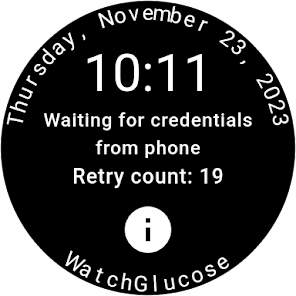
Concept is great, doesn't work in reality. It can only send credentials to a long dead watch that it still picks up for some reason, with no ability to send to an actually active watch, or select among multiple watches if you own more than one. A simple drop down instead of only allowing the first watch (in alphabetical order) would fix this.
1 person found this review helpful

David Combs
- Flag inappropriate
January 19, 2026
Great App. Just what I was looking for. Setup was a little confusing but I got it to work after a few tries. I'd like to see a few more watch faces or have the Graph face include the current glucose level. But it's great as is. so much easier than pulling up my level on my phone!

Tony Ames
- Flag inappropriate
- Show review history
January 5, 2026
Works well but be aware that if you stray from your phone, e.g. the phone is in another room, the last reading stays visible and unchanged until reunited with the phone. So your blood sugar levels may have risen/fallen substantially ERRATA -My mistake on not reading the instructions fully. This is a great app.
NdsSoft
January 1, 2026
Please read the User's Guide, where this is explained. "Pay attention to the time stamp (after "at") to ensure data is current. This is the time the glucose reading below was sent by the sensor...
If Glucose Values Are Outdated ...Your phone may be out of range ...These issues typically produce the "OLD VALUE " warning message."
What’s new
Users with multiple watches can now choose their preferred device.
App support
About the developer


