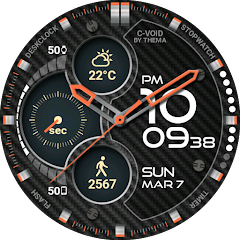
C-Void Watch Face
Contains adsIn-app purchases
4.3star
11.1K reviews
500K+
Downloads

Everyone
info


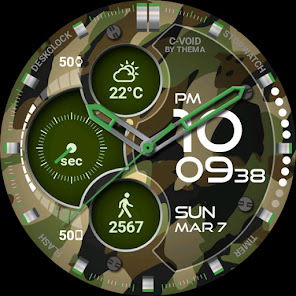
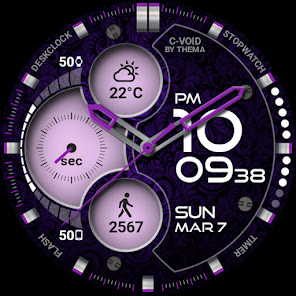
About this app
C-Void Watch Face for Wear OS!
★ Features of C-Void Watch Face ★
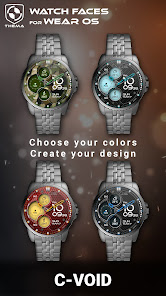
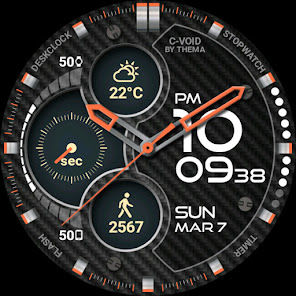
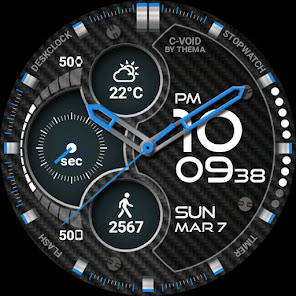
- Choose design colors
- Day & Month
- Watch battery
- Mobile battery (requires phone app)
- Weather (requires phone app)
The settings of the watch face are located in the "Wear OS" app of your mobile.
Just hit the gear icon over the watch face preview and the settings screen will show up!
★ FREE Settings ★
🔸Wear OS 2.X / 3.X / 4.X
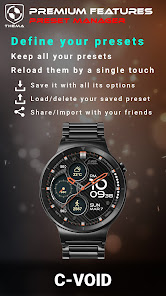
- Choose design colors on watch & mobile
- Define heartbeat frequency refresh rate
- Define weather refresh rate
- Weather unit
- 12 / 24 hours mode
- Define interactive mode duration
- Choose the ambient mode b&w and eco luminosity
- Choose to display a leading zero on hours
- Display brand name or not
- Choose to display or not the seconds dots
🔸Wear OS 6.X
- Choose design colors
- Choose date format
- Display shortcuts or not
- Display watch / mobile battery indicators or not
- ... and more
★ PREMIUM Settings ★
🔸Wear OS 2.X / 3.X / 4.X
- Choose your own title in place of "C-VOID"
- Switch between éco / simple b&w / full ambient mode
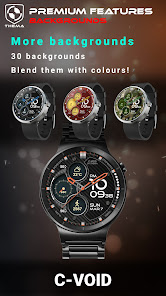
- Choose background among different styles
- Blend background with colors
- Define a secondary timezone for digital display
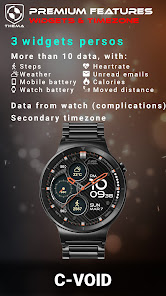
- Data:
+ Change the indicator to display on the 3 positions
+ Choose between up to 8 indicators (Daily step count, Heartbeat frequency, Unread Email from Gmail, etc...)
+ Complication (wear 2.0 & 3.0+)
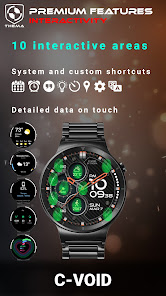
- Interactivity
+ Access to detailed data by touching a widget
+ Switch the displayed data by touching a widget
+ Change the shortcut to execute on the 4 positions
+ Choose your shortcut among all applications installed on your watch!
+ Choose to display the interactive areas
🔸Wear OS 6.X
- Choose background among different styles
- Blend background with colors
- Complication data:
+ Set the data you want on the widgets
+ Touch the widgets to start the data activity if available
- Interactivity
+ Access to detailed data by touching a widget
+ Modify the shortcuts: choose your shortcut among all applications installed on your watch!
★ Additional features on phone ★
- Notifications for new designs
- Access to support
- ... and more
★ Installation ★
🔸Wear OS 2.X / 3.X / 4.X
A notification will be displayed on your watch, right after your mobile installation. You just have to hit it to start the installation process of the watch face.
If the notification did not display for some reason, you can still install the watch face by using the Google Play Store available on your watch: just search the watch face by its name.
🔸Wear OS 6.X
Install the watch app to manage the watchface: the free version is automatically installed. Then use the "MANAGE" button in the top right shortcut of the watchface to update/upgrade your watch face.
★ More watch faces
Visit my watch faces collection for Wear OS on the Play Store at https://goo.gl/CRzXbS
** If you have any issues or questions, feel free to contact me by email (English or French language) before giving a bad rating. Thanks!
Website: https://www.themaapps.com
Youtube: https://youtube.com/ThomasHemetri
Twitter: https://x.com/ThomasHemetri
Instagram: https://www.instagram.com/thema_watchfaces
★ Features of C-Void Watch Face ★
- Choose design colors
- Day & Month
- Watch battery
- Mobile battery (requires phone app)
- Weather (requires phone app)
The settings of the watch face are located in the "Wear OS" app of your mobile.
Just hit the gear icon over the watch face preview and the settings screen will show up!
★ FREE Settings ★
🔸Wear OS 2.X / 3.X / 4.X
- Choose design colors on watch & mobile
- Define heartbeat frequency refresh rate
- Define weather refresh rate
- Weather unit
- 12 / 24 hours mode
- Define interactive mode duration
- Choose the ambient mode b&w and eco luminosity
- Choose to display a leading zero on hours
- Display brand name or not
- Choose to display or not the seconds dots
🔸Wear OS 6.X
- Choose design colors
- Choose date format
- Display shortcuts or not
- Display watch / mobile battery indicators or not
- ... and more
★ PREMIUM Settings ★
🔸Wear OS 2.X / 3.X / 4.X
- Choose your own title in place of "C-VOID"
- Switch between éco / simple b&w / full ambient mode
- Choose background among different styles
- Blend background with colors
- Define a secondary timezone for digital display
- Data:
+ Change the indicator to display on the 3 positions
+ Choose between up to 8 indicators (Daily step count, Heartbeat frequency, Unread Email from Gmail, etc...)
+ Complication (wear 2.0 & 3.0+)
- Interactivity
+ Access to detailed data by touching a widget
+ Switch the displayed data by touching a widget
+ Change the shortcut to execute on the 4 positions
+ Choose your shortcut among all applications installed on your watch!
+ Choose to display the interactive areas
🔸Wear OS 6.X
- Choose background among different styles
- Blend background with colors
- Complication data:
+ Set the data you want on the widgets
+ Touch the widgets to start the data activity if available
- Interactivity
+ Access to detailed data by touching a widget
+ Modify the shortcuts: choose your shortcut among all applications installed on your watch!
★ Additional features on phone ★
- Notifications for new designs
- Access to support
- ... and more
★ Installation ★
🔸Wear OS 2.X / 3.X / 4.X
A notification will be displayed on your watch, right after your mobile installation. You just have to hit it to start the installation process of the watch face.
If the notification did not display for some reason, you can still install the watch face by using the Google Play Store available on your watch: just search the watch face by its name.
🔸Wear OS 6.X
Install the watch app to manage the watchface: the free version is automatically installed. Then use the "MANAGE" button in the top right shortcut of the watchface to update/upgrade your watch face.
★ More watch faces
Visit my watch faces collection for Wear OS on the Play Store at https://goo.gl/CRzXbS
** If you have any issues or questions, feel free to contact me by email (English or French language) before giving a bad rating. Thanks!
Website: https://www.themaapps.com
Youtube: https://youtube.com/ThomasHemetri
Twitter: https://x.com/ThomasHemetri
Instagram: https://www.instagram.com/thema_watchfaces
Updated on
Safety starts with understanding how developers collect and share your data. Data privacy and security practices may vary based on your use, region, and age. The developer provided this information and may update it over time.

No data shared with third parties
Learn more about how developers declare sharing

This app may collect these data types
App activity and App info and performance

Data is encrypted in transit

Data can’t be deleted
Ratings and reviews
4.3
8.78K reviews

Daniel Wong
- Flag inappropriate
- Show review history
January 17, 2026
The latest update got rid of a bunch of customization that was on the previous version. For example there is no plain black background anymore. Digital background color used to have a lot more colors. And no option to show the full watch face on Always On Display. Add the features back! Update: If you are using wearOS6, this is very limited vs. OS5. The background colors for the dial area suck now and the AOD looks terrible. I DO NOT RECOMMEND FOR OS6!
thema
December 26, 2025
Hi,
Your watch is now running wear os 6.
You need to be sure to use the update of the watchface associated with wear os 6. Please send me an email at [email protected] if you need help

Chuck De La Rosa
- Flag inappropriate
April 6, 2022
Beautiful! I've been playing with a lot of different watch faces and this is by far one of the nicest and most configurable I've found. Most important are the large, easy to read widgets. The ability to customize the color combinations is amazing. I actually uninstalled it at one point because it appeared I had to install 3rd party apps to see the data I wanted but then I read another review citing the ability to use Complications.
26 people found this review helpful

Jeremy K
- Flag inappropriate
- Show review history
December 19, 2025
No longer as good as it was unfortunately... updated my watch OS and my watch face no longer functions as it did before. Can no longer load my previously saved watch face configuration or use custom colour picker. Can't configure watch on my phone anymore and many features are gone. Updates are supposed to improve things not lose features. Not happy, although this is Google's fault not the developer, the user still suffers. Irritated 😒 Thema were the best, not sure what to use now.
1 person found this review helpful
thema
December 19, 2025
Hi,
Unfortunately, the new watchface format is a bit restrictive on possibilities. This is why someoption are not available, at least for now.
I apologize for the inconvenience. This is Google decision. Please send me an email at [email protected] if I can help
What’s new
2.26.01.0418
- Added dark/light version
- Design and optimisations
- Bump libraries versions
- Fix crash
Requires app update on both Watch & Mobile.
If you have any issue, please let me know by email at [email protected]
- Added dark/light version
- Design and optimisations
- Bump libraries versions
- Fix crash
Requires app update on both Watch & Mobile.
If you have any issue, please let me know by email at [email protected]
App support
About the developer


