
Background Video Recorder Cam
Contains adsIn-app purchases
4.0star
2.1K reviews

Everyone
info
100K+
Downloads

Everyone
Learn more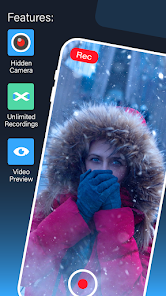
About this app
Professional Background Video Recorder (BVR)
The Background Video Recorder (BVR) is a feature-rich tool designed for secure, hands-free video capture. Use continuous recording while using other apps, or schedule recordings to start automatically. Whether you need a quick capture tool or a long-term recording solution, explore the power of our professional background recording engine.
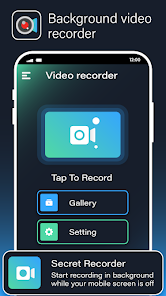
Our app provides a seamless way to record video with a single tap. High-utility functions include screen-off recording, automated scheduling, and a user-friendly interface that captures high-quality video and audio without requiring the app to be in the foreground.
Why Choose This Recorder?
This app is designed for users who need a reliable recording tool for lectures, meetings, or security purposes. You can start a private recording session with one click and customize your settings to fit your environment. This includes recording during phone calls or setting specific dates and times for your device to capture footage automatically.
The BVR app operates as an automated background utility for video and voice. It allows you to toggle camera shutter sounds and preview windows to suit your preference for a quiet recording environment. Even when your device is locked, the recording continues uninterrupted, ensuring you never miss a moment.
Key Features and Functions
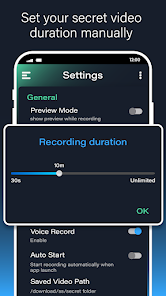
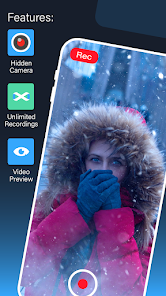
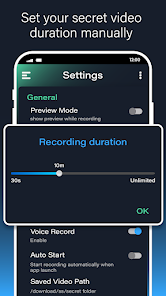
>>Unlimited Recording Duration: Capture as much footage as your storage allows.
>>Preview Toggle: Record with or without a visible camera preview window.
>>External Storage Support: Save your recorded videos directly to an SD card.
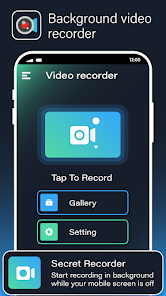
>>One-Touch Operation: Start or stop recording instantly with a single tap.
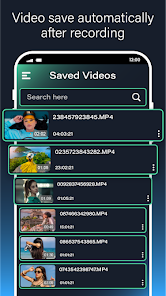
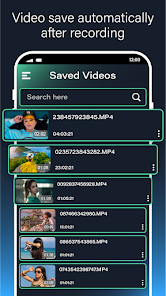
>>Built-in Video Trimmer: Quickly edit and trim your videos after recording.
>>Smart Orientation: Supports both portrait and landscape video modes.
>>Call Compatibility: Continues recording even during active phone calls.
>>Energy Efficient: Automatically turns off the screen while recording to save battery.
>>High-Definition Quality: Supports Full HD (1920x1080) and multiple other resolutions (720p, 480p).
>>Enhanced Security: Secure the app with a Passcode Lock.
>>Hands-Free Control: Use voice commands to start or stop recording.
>>Advanced Image Processing: Auto white balance and high-quality rendering options.
>>Optimized File Size: Video compression tools included for easier sharing.
>>Privacy Protection: All recorded files are password-protected within the app.
>>Smart Metadata: Securely coded with optional geotagging for file organization.
>>Dual Camera Support: Use either the front or back camera.
>>Professional Modes: Includes night mode and shutter sound controls.
The Background Video Recorder (BVR) is a feature-rich tool designed for secure, hands-free video capture. Use continuous recording while using other apps, or schedule recordings to start automatically. Whether you need a quick capture tool or a long-term recording solution, explore the power of our professional background recording engine.
Our app provides a seamless way to record video with a single tap. High-utility functions include screen-off recording, automated scheduling, and a user-friendly interface that captures high-quality video and audio without requiring the app to be in the foreground.
Why Choose This Recorder?
This app is designed for users who need a reliable recording tool for lectures, meetings, or security purposes. You can start a private recording session with one click and customize your settings to fit your environment. This includes recording during phone calls or setting specific dates and times for your device to capture footage automatically.
The BVR app operates as an automated background utility for video and voice. It allows you to toggle camera shutter sounds and preview windows to suit your preference for a quiet recording environment. Even when your device is locked, the recording continues uninterrupted, ensuring you never miss a moment.
Key Features and Functions
>>Unlimited Recording Duration: Capture as much footage as your storage allows.
>>Preview Toggle: Record with or without a visible camera preview window.
>>External Storage Support: Save your recorded videos directly to an SD card.
>>One-Touch Operation: Start or stop recording instantly with a single tap.
>>Built-in Video Trimmer: Quickly edit and trim your videos after recording.
>>Smart Orientation: Supports both portrait and landscape video modes.
>>Call Compatibility: Continues recording even during active phone calls.
>>Energy Efficient: Automatically turns off the screen while recording to save battery.
>>High-Definition Quality: Supports Full HD (1920x1080) and multiple other resolutions (720p, 480p).
>>Enhanced Security: Secure the app with a Passcode Lock.
>>Hands-Free Control: Use voice commands to start or stop recording.
>>Advanced Image Processing: Auto white balance and high-quality rendering options.
>>Optimized File Size: Video compression tools included for easier sharing.
>>Privacy Protection: All recorded files are password-protected within the app.
>>Smart Metadata: Securely coded with optional geotagging for file organization.
>>Dual Camera Support: Use either the front or back camera.
>>Professional Modes: Includes night mode and shutter sound controls.
Updated on
Safety starts with understanding how developers collect and share your data. Data privacy and security practices may vary based on your use, region, and age. The developer provided this information and may update it over time.

No data shared with third parties
Learn more about how developers declare sharing

This app may collect these data types
Device or other IDs

Data is encrypted in transit

Data can’t be deleted
Ratings and reviews
4.1
2.08K reviews

Doctor Pepper
- Flag inappropriate
- Show review history
December 27, 2023
Not happy. Used to be the perfect recording app, then they added ads on startup even after I paid for the full version. The problem is that the ads hardly ever F#@$ing load!! Therefore the app no longer starts up and is unusable most of the time. Also, forget using the app anywhere you don't have an internet connection altogether because... The ads can't load therefore the app can't start. Stupid, stupid update. EDIT: app no longer records sound...
12 people found this review helpful
Go Get International LLC
February 22, 2024
We are sorry for this, but to continue work on this free app we need revenue from Ads. If you don't want to see the Ads you can purchase the Pro version. Thanks for your understanding! If you have any other issue please contact us at [email protected]

Daniel Friesen
- Flag inappropriate
July 25, 2024
It requires you to pay for use And it doesn't work, there's no overscreen widget that you can control it with and even if you press recorder from the app itself when you go back and end recording it doesn't save it🤬🤬🖕
17 people found this review helpful

Sana Kanwal 67
- Flag inappropriate
November 28, 2022
Background video recorded camera is great. Easy to use. No ads shown inside the app. Easy to record the videos,♥️
27 people found this review helpful
What’s new
Bug Fixed
Features Improved
Features Improved
Everyone
Learn moreApp support
About the developer
Go Get International LLC
3975 Netherstone Ln
High Point, NC 27265-9701
United States
+1 336-860-1835


