
Scan & Split Bill - OCR Check
Contains adsIn-app purchases
4.5star
1.04K reviews
100K+
Downloads

Everyone
info






About this app
Split restaurant check, grocery store bill, or any other tab quick and easy in just few taps:
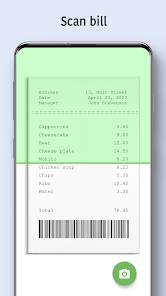
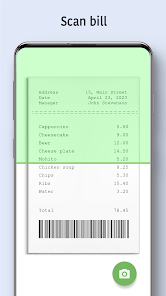
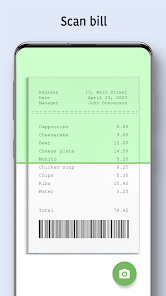
✓ take bill photo 📷
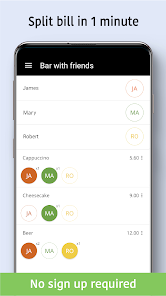
✓ split check items
✓ share bill with friends 👍
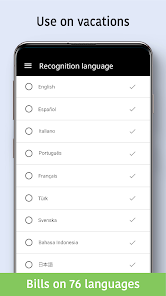
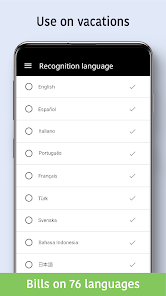
”Scan & Split Bill” is a unique bill splitter app that supports optical character recognition on 76 languages 🌎 and can OCR receipt offline!
🚀 Key features:
☆ 3 ways to add check: snap bill picture, open check photo from image gallery, enter receipt items manually
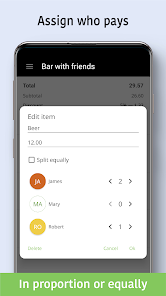
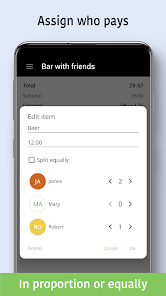
☆ 3 bill split modes: by items (“go Dutch”), in proportion, or equally
☆ receipt organizer: keep history of all bills, bill tracker
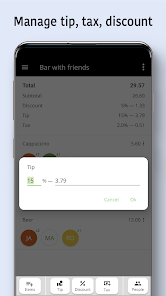
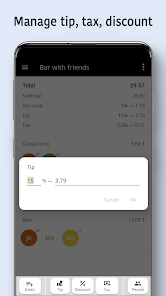
☆ tip calculator: calculate the amount of tip you want to leave and easily split tip between friends according to share percentage
☆ groups: create groups of people with whom you often have split payment
☆ taxes & discounts: automatic detection (coming soon)
☆ share bills: send personal check to all participants or individuals
Forget about calculator. Install app for FREE and go Dutch easily!
✓ take bill photo 📷
✓ split check items
✓ share bill with friends 👍
”Scan & Split Bill” is a unique bill splitter app that supports optical character recognition on 76 languages 🌎 and can OCR receipt offline!
🚀 Key features:
☆ 3 ways to add check: snap bill picture, open check photo from image gallery, enter receipt items manually
☆ 3 bill split modes: by items (“go Dutch”), in proportion, or equally
☆ receipt organizer: keep history of all bills, bill tracker
☆ tip calculator: calculate the amount of tip you want to leave and easily split tip between friends according to share percentage
☆ groups: create groups of people with whom you often have split payment
☆ taxes & discounts: automatic detection (coming soon)
☆ share bills: send personal check to all participants or individuals
Forget about calculator. Install app for FREE and go Dutch easily!
Updated on
Safety starts with understanding how developers collect and share your data. Data privacy and security practices may vary based on your use, region, and age. The developer provided this information and may update it over time.

No data shared with third parties
Learn more about how developers declare sharing

This app may collect these data types
Location, App activity and 2 others

Data is encrypted in transit

Data can’t be deleted
Ratings and reviews
4.5
1.02K reviews

A Google user
- Flag inappropriate
February 1, 2019
Finally found an app that can split a bill by items instead of just dividing the total cost by the number of people. OCR worked great on a clearly printed receipt and almost perfectly on a less clear receipt. But editing entries is easy. I had to remove the 'Tax' item, and enter the value after the tip percentage, but the whole process is so much faster and smoother than doing a bunch of math at a restaurant.
17 people found this review helpful
Standy Software
February 13, 2020
Andrew, thank you for the feedback. We released auto detection for discounts and ability to set tax and discount not only by amount, but also by percentage. Enjoy!

Dr. Swayam Sourav Tripathy
- Flag inappropriate
September 4, 2023
Exactly what I wanted. It has OCR to scan the bills, and you can assign which person had what at the restaurant, assign tax, discount and tips. You don't need to do the math, the app will do it for you. You can also enter the items manually. You also don't need an account to use the app. The ad is not obnoxious and dismissable with only one click. Love it!
4 people found this review helpful
Standy Software
September 7, 2023
Swayam, thank you so much for the feedback, we are glad to hear this :)
A Google user
- Flag inappropriate
- Show review history
April 8, 2020
I wanted something that could photograph a supermarket receipt and allow me to allocate the items to different people. This did exactly that and read a 30 item receipt adequately. It didn't scan multi-line entries, but it was good enough for me. It just scanned the last line of multi line entries. Nice work! EDIT: Thanks for the reply. I understand the challenges. Perhaps an option is to have a button to merge it with the line above or below. That may be too much work for some people tho.
11 people found this review helpful
Standy Software
August 9, 2021
Dear Cam, thank you for the feedback and high rating. We have implemented experimental feature to join 1 line above the line with the price. If you want to test it, please email us, we will provide the build. We plan to release a configurable setting where user can specify what to do: join 1 line above, join 1 line below, work in single line mode.
What’s new
☆ 3 letters for names of participants
☆ participant names or group names in the bill name
☆ minor improvements and bug fixes
🇺🇸 If you are ready to help with app translation into other languages, just let us know [email protected] Pro version for all translators!
☆ participant names or group names in the bill name
☆ minor improvements and bug fixes
🇺🇸 If you are ready to help with app translation into other languages, just let us know [email protected] Pro version for all translators!
App support
About the developer


