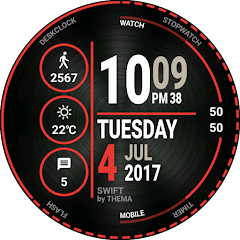
Swift Watch Face
Contains adsIn-app purchases
4.5star
10.6K reviews
1M+
Downloads

Everyone
info




About this app
Swift Watch Face for Wear OS!
★ Features of Swift Watch Face ★
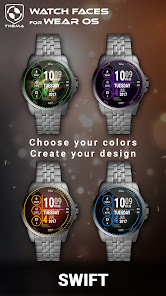
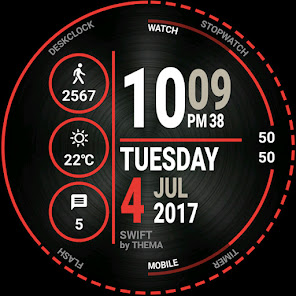
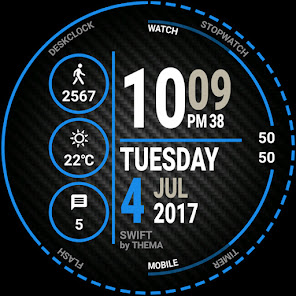
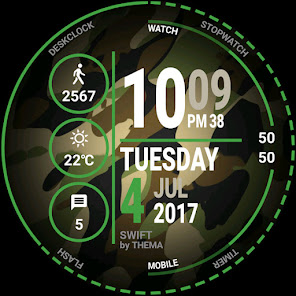
- Choose design colors
- Day & Month
- Watch battery
- Mobile battery (requires phone app)
- Weather (requires phone app)
The settings of the watch face are located in the "Wear OS" app of your mobile.
Just hit the gear icon over the watch face preview and the settings screen will show up!
★ FREE Settings ★
🔸Wear OS 2.X / 3.X / 4.X
- Choose design colors on watch & mobile
- Define heartbeat frequency refresh rate
- Define weather refresh rate
- Weather unit
- 12 / 24 hours mode
- Define interactive mode duration
- Choose the ambient mode b&w and eco luminosity
- Choose to display a leading zero on hours
- Display brand name or not
- Choose to display or not the seconds dots
🔸Wear OS 6.X
- Choose design colors
- Choose date format
- Display shortcuts or not
- Display watch / mobile battery indicators or not
- ... and more
★ PREMIUM Settings ★
🔸Wear OS 2.X / 3.X / 4.X
- Choose your own title in place of "SWIFT"
- Switch between éco / simple b&w / full ambient mode
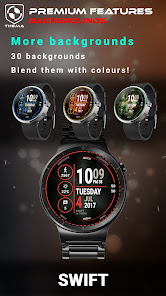
- Choose background among different styles
- Blend background with colors
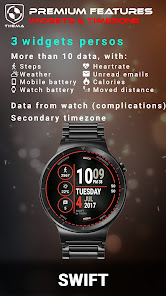
- Define a secondary timezone for digital display
- Data:
+ Change the indicator to display on the 3 positions
+ Choose between up to 8 indicators (Daily step count, Heartbeat frequency, Unread Email from Gmail, etc...)
+ Complication (wear 2.0 & 3.0)
- Interactivity
+ Access to detailed data by touching a widget
+ Switch the displayed data by touching a widget
+ Change the shortcut to execute on the 4 positions
+ Choose your shortcut among all applications installed on your watch!
+ Choose to display the interactive areas
🔸Wear OS 6.X
- Choose background among different styles
- Blend background with colors
- Complication data:
+ Set the data you want on the widgets
+ Touch the widgets to start the data activity if available
- Interactivity
+ Access to detailed data by touching a widget
+ Modify the shortcuts: choose your shortcut among all applications installed on your watch!
★ Additional features on phone ★
- Notifications for new designs
- Access to support
- ... and more
★ Installation ★
🔸Wear OS 2.X / 3.X / 4.X
A notification will be displayed on your watch, right after your mobile installation. You just have to hit it to start the installation process of the watch face.
If the notification did not display for some reason, you can still install the watch face by using the Google Play Store available on your watch: just search the watch face by its name.
🔸Wear OS 6.X
Install the watch app to manage the watchface: the free version is automatically installed. Then use the "MANAGE" button in the top right shortcut of the watchface to update/upgrade your watch face.
★ More watch faces
Visit my watch faces collection for Wear OS on the Play Store at https://goo.gl/CRzXbS
** If you have any issues or questions, feel free to contact me by email (English or French language) before giving a bad rating. Thanks!
Website: https://www.themaapps.com/
Youtube: https://youtube.com/ThomasHemetri
Twitter: https://x.com/ThomasHemetri
Instagram: https://www.instagram.com/thema_watchfaces
★ Features of Swift Watch Face ★
- Choose design colors
- Day & Month
- Watch battery
- Mobile battery (requires phone app)
- Weather (requires phone app)
The settings of the watch face are located in the "Wear OS" app of your mobile.
Just hit the gear icon over the watch face preview and the settings screen will show up!
★ FREE Settings ★
🔸Wear OS 2.X / 3.X / 4.X
- Choose design colors on watch & mobile
- Define heartbeat frequency refresh rate
- Define weather refresh rate
- Weather unit
- 12 / 24 hours mode
- Define interactive mode duration
- Choose the ambient mode b&w and eco luminosity
- Choose to display a leading zero on hours
- Display brand name or not
- Choose to display or not the seconds dots
🔸Wear OS 6.X
- Choose design colors
- Choose date format
- Display shortcuts or not
- Display watch / mobile battery indicators or not
- ... and more
★ PREMIUM Settings ★
🔸Wear OS 2.X / 3.X / 4.X
- Choose your own title in place of "SWIFT"
- Switch between éco / simple b&w / full ambient mode
- Choose background among different styles
- Blend background with colors
- Define a secondary timezone for digital display
- Data:
+ Change the indicator to display on the 3 positions
+ Choose between up to 8 indicators (Daily step count, Heartbeat frequency, Unread Email from Gmail, etc...)
+ Complication (wear 2.0 & 3.0)
- Interactivity
+ Access to detailed data by touching a widget
+ Switch the displayed data by touching a widget
+ Change the shortcut to execute on the 4 positions
+ Choose your shortcut among all applications installed on your watch!
+ Choose to display the interactive areas
🔸Wear OS 6.X
- Choose background among different styles
- Blend background with colors
- Complication data:
+ Set the data you want on the widgets
+ Touch the widgets to start the data activity if available
- Interactivity
+ Access to detailed data by touching a widget
+ Modify the shortcuts: choose your shortcut among all applications installed on your watch!
★ Additional features on phone ★
- Notifications for new designs
- Access to support
- ... and more
★ Installation ★
🔸Wear OS 2.X / 3.X / 4.X
A notification will be displayed on your watch, right after your mobile installation. You just have to hit it to start the installation process of the watch face.
If the notification did not display for some reason, you can still install the watch face by using the Google Play Store available on your watch: just search the watch face by its name.
🔸Wear OS 6.X
Install the watch app to manage the watchface: the free version is automatically installed. Then use the "MANAGE" button in the top right shortcut of the watchface to update/upgrade your watch face.
★ More watch faces
Visit my watch faces collection for Wear OS on the Play Store at https://goo.gl/CRzXbS
** If you have any issues or questions, feel free to contact me by email (English or French language) before giving a bad rating. Thanks!
Website: https://www.themaapps.com/
Youtube: https://youtube.com/ThomasHemetri
Twitter: https://x.com/ThomasHemetri
Instagram: https://www.instagram.com/thema_watchfaces
Updated on
Safety starts with understanding how developers collect and share your data. Data privacy and security practices may vary based on your use, region, and age. The developer provided this information and may update it over time.

No data shared with third parties
Learn more about how developers declare sharing

This app may collect these data types
App activity and App info and performance

Data is encrypted in transit

Data can’t be deleted
Ratings and reviews
4.6
8.78K reviews

Marty F.
- Flag inappropriate
- Show review history
January 25, 2025
Nice, clean looking watch face for basic timekeeping - shows all the time and date information clearly and the watch/phone battery level display is a nice touch. I have one widget showing heartbeat, which I like to monitor. There aren't a lot of choices for these, so I only show one. The launchers would be nice, but unfortunately, it seems like most of them do not work at all, at least not on my Samsung GW4 Pro. Neither the widgets nor the shortcuts seem to work
1 person found this review helpful

J A
- Flag inappropriate
- Show review history
March 27, 2024
Best watch face I've ever had. I love that it clearly shows the time, month, day, and date and you can customize the colors of them! When I first purchased the premium features, I didn't activate them right away because I had to go back to work. I forgot it about it for 4 days and in the long run found out that the price that I paid was refunded to me 3 days after making the purchase. I imagine because I never activated the features "in time". I love watch faces that display all the date info!
10 people found this review helpful
thema
March 13, 2024
Hi. This should not happen. Can you send me your order number by email at [email protected] I'll check the order status

Jeffrey Warner
- Flag inappropriate
August 10, 2023
ANOTHER GREAT FACE!!! The customization of Thema Faces is AWESOME! The only thing that I can't customize, but am hopeful to be able to do so soon is the text colors of the shortcut apps. This is my fourth Thema Face (Also have; Guardian, Phant, & Futuristic Gui). Can't say enough about these faces, like I said, would just like to be able to customize the shortcut text.
2 people found this review helpful
What’s new
2.26.01.0519
- Design and optimisations
- Bump libraries versions
- Fix crash
Requires app update on both Watch & Mobile.
If you have any issue, please let me know by email at [email protected]
- Design and optimisations
- Bump libraries versions
- Fix crash
Requires app update on both Watch & Mobile.
If you have any issue, please let me know by email at [email protected]
App support
About the developer


