
Light Meter - Lux Meter
Contains adsIn-app purchases
4.9star
15.7K reviews
1M+
Downloads

Everyone
info




About this app
The suitable light intensity is very important in the life. It affects health and work efficiency. Therefore, you need to know the current brightness level in your environment to adjust accordingly.
You don't need to buy an expensive light meter, you can use your own smartphone.
Our light meter, lux meter application is a free tool to measure light intensity (Lux/Fc). With this app, you can now measure the brightness level at work, school, home or anywhere with your smartphone.
It has a simple interface, very easy to use and full of features. To get started, you place your phone where it needs to be measured, then open our app. It will immediately display the measured brightness value.
You can measure light intensity over long periods of time. The application automatically saves and statistics the measurement, allowing you to view and analyze the data later.
Outstanding features of the lux meter, light meter:
- Flexible switching between analog and digital interfaces.
- Change illuminance units Lux or Fc.
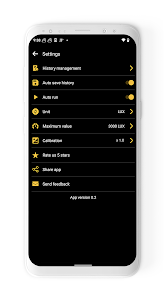
- Support calibration because the performance of light sensor on each device is different
- Start, pause or reset the measurement
- Automatically save measurement history. Support to view, delete or share measurement results.
- Display statistical data including minimum, maximum and average illuminance values
- Visual and beautiful chart
- Customize the maximum value on the meter
- All free
- No internet connection is required
The lux meter, light meter app is a great free tool that helps you to know the exact brightness level.
Download and start working on it now.
Please email us: [email protected] if you have any questions or suggestions about the app. We are always happy to listen to you.
You don't need to buy an expensive light meter, you can use your own smartphone.
Our light meter, lux meter application is a free tool to measure light intensity (Lux/Fc). With this app, you can now measure the brightness level at work, school, home or anywhere with your smartphone.
It has a simple interface, very easy to use and full of features. To get started, you place your phone where it needs to be measured, then open our app. It will immediately display the measured brightness value.
You can measure light intensity over long periods of time. The application automatically saves and statistics the measurement, allowing you to view and analyze the data later.
Outstanding features of the lux meter, light meter:
- Flexible switching between analog and digital interfaces.
- Change illuminance units Lux or Fc.
- Support calibration because the performance of light sensor on each device is different
- Start, pause or reset the measurement
- Automatically save measurement history. Support to view, delete or share measurement results.
- Display statistical data including minimum, maximum and average illuminance values
- Visual and beautiful chart
- Customize the maximum value on the meter
- All free
- No internet connection is required
The lux meter, light meter app is a great free tool that helps you to know the exact brightness level.
Download and start working on it now.
Please email us: [email protected] if you have any questions or suggestions about the app. We are always happy to listen to you.
Updated on
Safety starts with understanding how developers collect and share your data. Data privacy and security practices may vary based on your use, region, and age. The developer provided this information and may update it over time.


Ratings and reviews
4.9
15.5K reviews

Elvis
- Flag inappropriate
March 28, 2026
Don't know how accurate this is, but it satisfied my need for "having an idea" of the level of sunlight hitting my solar panels at tracked angles. For as long as other variables remain the same, the comparison of values at different times of the day & different panel angles works for me. For those needing accurate values, there's opportunity to calibrate against known standards and then input a correction factor. There are adverts but not in annoying forms or frequency it's an awesome app.
Coolexp
March 31, 2026
Thank you very much for the nice review. We will continue to work hard to make the app better and better.

Never Mind
- Flag inappropriate
- Show review history
February 13, 2026
meter reading jumps from zero up to some higher value constantly. Perhaps this is why Android can't even correctly set the screen brightness automatically anymore. I noted the last Android/Samsung update seems to have broken all light meter apps. Sad Android/Samsung is so buggy.
3 people found this review helpful
Coolexp
February 17, 2026
Hi, we are sorry for the inconvenience. The app depends on the light sensor of the phone. If the light sensor is unstable, the app will not work correctly.

Mario Rossi
- Flag inappropriate
April 1, 2026
No info in what the app does but decide to test to see if (by the name) was able to increase the bright on the screen and didn't see such option anywhere, so a complete useless app. For my personal opinion, the other reviews sounds like AI generated.
Coolexp
April 3, 2026
Dear User, We are so sorry for the inconvenience, but there is a some confusion about your comment. Could you please explain the specific problems or send a screenshot to us at [email protected]?
App support
About the developer


