
Grocery AI: Shop, Cook, Pantry
In-app purchases
3.8star
343 reviews
10K+
Downloads

Everyone
info



About this app
Waste less food. Save money. Stay stocked.
Grocery AI helps you track your groceries, manage pantry inventory, get expiry alerts, organize recipes, plan meals, and build smarter shopping lists based on what you already have and what you’re running low on.
Know what’s in your pantry, fridge, and freezer. Use ingredients before they expire. Avoid duplicate purchases. Plan meals around food you already have. Build shopping lists faster with AI-powered imports, barcode scanning, receipt scanning, voice entry, and recipe-based shopping.
Whether you’re managing weekly groceries, trying to reduce food waste, organizing family meals, or keeping your kitchen better stocked, Grocery AI helps you stay organized and shop with confidence.
REDUCE FOOD WASTE AND STAY STOCKED
• Track grocery purchases and move items into inventory
• Organize pantry, fridge, freezer, and custom storage locations
• Monitor stock with quantities or percentage-left
• Add expiry dates, barcodes, photos, notes, and multipack sizes
• Get alerts for low stock, out of stock, expiring soon, and expired items
• Use ingredients before they go bad and avoid buying duplicates
• Import inventory from receipts, notes, pantry photos, CSV, and Excel files
SMART SHOPPING LISTS
• Create shopping lists for different stores, trips, and occasions
• Add items by search, barcode scan, Voice Add, receipt import, note import, photo import, or recipes
• Build lists from what is low, missing, or needed for upcoming meals
• Review imported items more easily before saving
• Search, sort, tag, and organize items your way
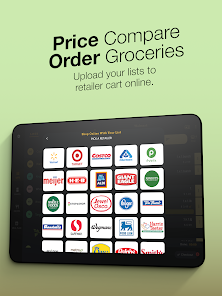
• Save receipts, compare prices, and keep rewards cards linked for faster checkout
VOICE ADD 2.0 AND AI IMPORTS
• Capture an entire grocery run hands-free with Voice Add 2.0
• Turn natural speech into structured grocery items with quantities, sizes, units, brands, and notes
• Import items from receipts, notes, shelf photos, pantry photos, and other images
• Get clearer scan feedback and stronger fallback handling when a product is not recognized
• Spend less time cleaning up imported items with smarter AI organization
RECIPES AND COOKING
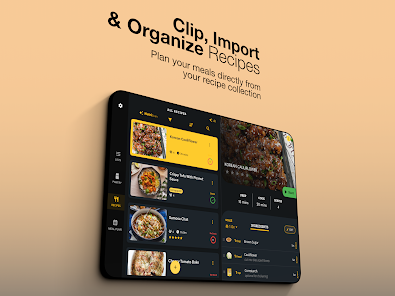
• Save, organize, and explore recipes more easily
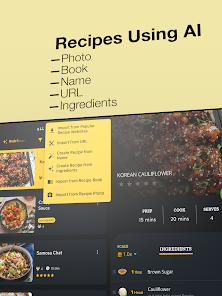
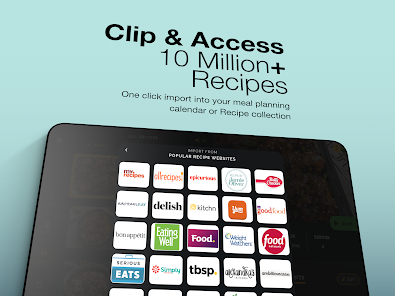
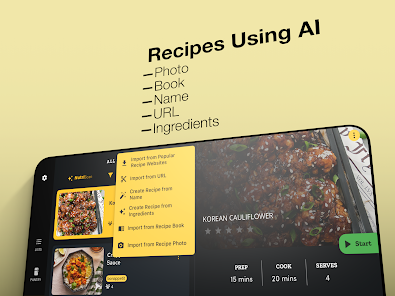
• Import recipes from websites, URLs, cookbook pages, and AI tools
• Generate recipes from ingredients you already have
• Generate recipes from a dish name or food photo
• Use pantry-aware Chef AI for meal ideas, substitutions, and cooking help based on your inventory
• Add recipe ingredients to shopping lists with scaled quantities
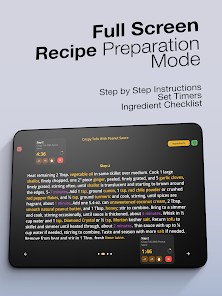
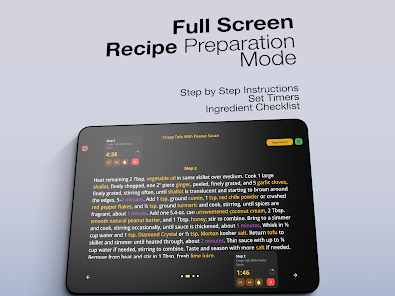
• Use improved cooking mode, better step navigation, and multiple timers with alerts
MEAL PLANNING
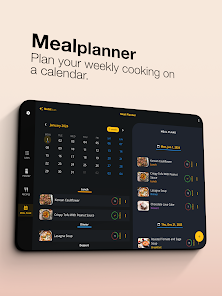
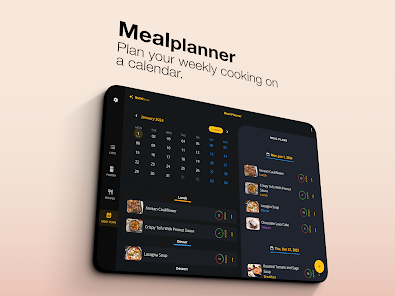
• Plan meals for the week with recipes or quick meal items
• Build meal plans around ingredients that need to be used soon
• Mark meals as eaten to help keep inventory accurate
• Print or email meal plans for the family or the fridge
• Keep meal planning more connected to recipes, inventory, and shopping lists
WIDGETS, WATCH, AND MULTI-DEVICE SUPPORT
• Use widgets for shopping lists, inventory, recipes, and meal plans
• Open the right part of the app faster with smoother deep linking
• Use Apple Watch support for lists and inventory alerts if you also use Grocery AI on iPhone
• Sync Shopping Lists, Inventory, Recipes, and Meal Planner across supported devices with the same Grocery AI account
DESIGNED TO HELP YOU STAY ORGANIZED
• Cleaner layouts across phone, tablet, and desktop experiences
• Better keyboard support, improved accessibility, and smoother navigation
• Modern dark theme with polished visuals and frosted-glass styling
• In-app guides for Shopping Lists, Inventory, Recipes, Meal Planner, widgets, sync, and more
Grocery AI brings together grocery shopping, pantry tracking, recipe organization, meal planning, and AI tools in one connected experience, helping you waste less food, stay stocked, and cook smarter.
Grocery AI helps you track your groceries, manage pantry inventory, get expiry alerts, organize recipes, plan meals, and build smarter shopping lists based on what you already have and what you’re running low on.
Know what’s in your pantry, fridge, and freezer. Use ingredients before they expire. Avoid duplicate purchases. Plan meals around food you already have. Build shopping lists faster with AI-powered imports, barcode scanning, receipt scanning, voice entry, and recipe-based shopping.
Whether you’re managing weekly groceries, trying to reduce food waste, organizing family meals, or keeping your kitchen better stocked, Grocery AI helps you stay organized and shop with confidence.
REDUCE FOOD WASTE AND STAY STOCKED
• Track grocery purchases and move items into inventory
• Organize pantry, fridge, freezer, and custom storage locations
• Monitor stock with quantities or percentage-left
• Add expiry dates, barcodes, photos, notes, and multipack sizes
• Get alerts for low stock, out of stock, expiring soon, and expired items
• Use ingredients before they go bad and avoid buying duplicates
• Import inventory from receipts, notes, pantry photos, CSV, and Excel files
SMART SHOPPING LISTS
• Create shopping lists for different stores, trips, and occasions
• Add items by search, barcode scan, Voice Add, receipt import, note import, photo import, or recipes
• Build lists from what is low, missing, or needed for upcoming meals
• Review imported items more easily before saving
• Search, sort, tag, and organize items your way
• Save receipts, compare prices, and keep rewards cards linked for faster checkout
VOICE ADD 2.0 AND AI IMPORTS
• Capture an entire grocery run hands-free with Voice Add 2.0
• Turn natural speech into structured grocery items with quantities, sizes, units, brands, and notes
• Import items from receipts, notes, shelf photos, pantry photos, and other images
• Get clearer scan feedback and stronger fallback handling when a product is not recognized
• Spend less time cleaning up imported items with smarter AI organization
RECIPES AND COOKING
• Save, organize, and explore recipes more easily
• Import recipes from websites, URLs, cookbook pages, and AI tools
• Generate recipes from ingredients you already have
• Generate recipes from a dish name or food photo
• Use pantry-aware Chef AI for meal ideas, substitutions, and cooking help based on your inventory
• Add recipe ingredients to shopping lists with scaled quantities
• Use improved cooking mode, better step navigation, and multiple timers with alerts
MEAL PLANNING
• Plan meals for the week with recipes or quick meal items
• Build meal plans around ingredients that need to be used soon
• Mark meals as eaten to help keep inventory accurate
• Print or email meal plans for the family or the fridge
• Keep meal planning more connected to recipes, inventory, and shopping lists
WIDGETS, WATCH, AND MULTI-DEVICE SUPPORT
• Use widgets for shopping lists, inventory, recipes, and meal plans
• Open the right part of the app faster with smoother deep linking
• Use Apple Watch support for lists and inventory alerts if you also use Grocery AI on iPhone
• Sync Shopping Lists, Inventory, Recipes, and Meal Planner across supported devices with the same Grocery AI account
DESIGNED TO HELP YOU STAY ORGANIZED
• Cleaner layouts across phone, tablet, and desktop experiences
• Better keyboard support, improved accessibility, and smoother navigation
• Modern dark theme with polished visuals and frosted-glass styling
• In-app guides for Shopping Lists, Inventory, Recipes, Meal Planner, widgets, sync, and more
Grocery AI brings together grocery shopping, pantry tracking, recipe organization, meal planning, and AI tools in one connected experience, helping you waste less food, stay stocked, and cook smarter.
Updated on
Safety starts with understanding how developers collect and share your data. Data privacy and security practices may vary based on your use, region, and age. The developer provided this information and may update it over time.


Ratings and reviews
3.8
324 reviews

Karen Moctezuma
- Flag inappropriate
March 15, 2026
I love the pantry tracking feature, and the interactive tool for adjusting pantry items' quantities is great. Recipes show which ingredients I already have, but when adding ingredients to the shopping list, it adds all of them, including the ones marked as “in pantry.” I like that it connects to some stores for easy shopping. You can add pantry items by taking one photo of multiple items. Unfortunately, you can’t import recipes from social media (FB, Instagram, etc), only from recipe websites.
Pocket Labs
April 7, 2026
This issue is now resolved and Importing from social media is also now available. We just launched Grocery AI v3.0, which is our biggest update yet. Please install the latest update and give it another try. For any questions or help, reach us anytime at [email protected].

Shelly Storm
- Flag inappropriate
April 5, 2025
Missing The Old Grocery King. I was very happy when I stumbled upon this app after The Grocery King went under a few years back. I'm paying for the premium version, trying my very best to like it, but I just can't. I cannot delete items. After checking out pantry doesn't get updated. I end up with duplicate items ; not sure what that means & expired items doesn't automatically get added to respective shopping lists. The only thing i like is being able to add actual photos of each item.
4 people found this review helpful
Pocket Labs
April 7, 2026
All the issues you raised are now fixed in the latest update. We just launched Grocery AI v3.0, which is our biggest update yet. Please install the latest update and give it another try. For any questions or help, reach us anytime at [email protected].

Emily Boyd
- Flag inappropriate
January 26, 2025
The AI feature to pull ingredients when taking a picture from a cook book did not work. I spent and hour trying different ways and it couldn't extract the correct ingredients and instructions from the page. The app is beautifully laid out and the aesthetics are great. I was really looking for an app to pull ingredients from printed cookbooks. And I was kind of bummed because I had to spend $10 to use the feature...
8 people found this review helpful
Pocket Labs
April 7, 2026
We just launched v3.0 update and is our biggest update ever. The AI features are drastically improved now, you should give us a try again, we're confident you will love it. We also now offer a free trial. We've also drastically lowered the subscription price, so please support us. If you have any further concerns, reach us at [email protected]
What’s new
This update makes Grocery AI smoother across the app: onboarding is clearer, plan options are easier to understand, shopping lists are faster to use, recipe search is more helpful, and inventory reminders are more reliable. We also polished the home screen and item editing flow to make everyday tasks feel quicker and cleaner.
App support
About the developer
Pocket Labs L.L.C.
11 Garrison Ct
Belle Mead, NJ 08502-4024
United States
+1 609-559-0188


