
Pure Icon Changer - Shortcut
Contains adsIn-app purchases
4.1star
23.2K reviews
500K+
Downloads

Everyone
info
About this app
Pure Icon Changer is a free and useful app which can help you change & customize icons and names for any apps.
The new icons can be chosen from gallery and other app icons.
Our app will create a shortcut to the new icon on your home screen. This is the simplest way to decorate your android phone.
How To Use :
1.Open Pure Icon Changer
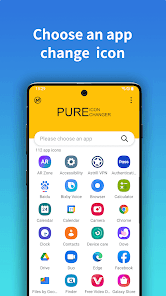
2.Choose an app
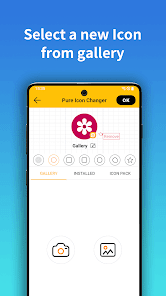
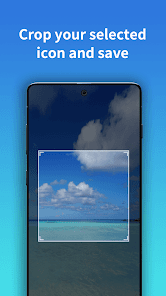
3.Select a new Icon form Gallery, Camera or other app icons. Select your love shape form given list
4.Edit a new name for the app
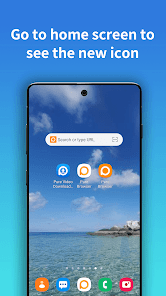
5.Go to home screen to see the new shortcut icon
About the Watermark :
1.On Android 8.0 and above, some Phone System automatically add a corner mark to the newly created shortcut icon.We can help you to make app icon without watermark using widget technology.Follow below steps.
2.widget_guide_desc1">"Go to your phone's desktop, Long press & hold a blank space, then click "Widgets" from the pop-up menu.
3.Find "Pure Icon Changer" in widget page, touch & hold it and drag it to your desktop.
4.The widget of Pure Icon Changer will be opened automatically. After that you can make your app icon without any Watermarks.
The new icons can be chosen from gallery and other app icons.
Our app will create a shortcut to the new icon on your home screen. This is the simplest way to decorate your android phone.
How To Use :
1.Open Pure Icon Changer
2.Choose an app
3.Select a new Icon form Gallery, Camera or other app icons. Select your love shape form given list
4.Edit a new name for the app
5.Go to home screen to see the new shortcut icon
About the Watermark :
1.On Android 8.0 and above, some Phone System automatically add a corner mark to the newly created shortcut icon.We can help you to make app icon without watermark using widget technology.Follow below steps.
2.widget_guide_desc1">"Go to your phone's desktop, Long press & hold a blank space, then click "Widgets" from the pop-up menu.
3.Find "Pure Icon Changer" in widget page, touch & hold it and drag it to your desktop.
4.The widget of Pure Icon Changer will be opened automatically. After that you can make your app icon without any Watermarks.
Updated on
Safety starts with understanding how developers collect and share your data. Data privacy and security practices may vary based on your use, region, and age. The developer provided this information and may update it over time.

No data shared with third parties
Learn more about how developers declare sharing

No data collected
Learn more about how developers declare collection

Data is encrypted in transit

Data can’t be deleted
Ratings and reviews
4.2
22.5K reviews

Wil Steele
- Flag inappropriate
March 11, 2026
Not a great app. didn't realize that this is just creating shortcuts on the home screen not actually changing the app icons. when it does change the icon for the shortcut the first one I made was all messed up. looked like parts of it were missing. on top of that there's no search when you're going through icon packs. there aren't even letters to tell where you're at in the icon pack while you're scrolling. This app definitely seems unfinished and isn't what I was looking for.
1 person found this review helpful
PureBrowser
March 13, 2026
Thank you so much for your suggestion. First, I want to clarify that due to system limitations, the icon changer cannot change the application's own icon. You can hide the original icon and use the newly created shortcut. Second, your suggestion regarding the icon pack search function is excellent. Thank you for your support.

Scarlet Dizon
- Flag inappropriate
January 29, 2026
This app gets the job done but it takes forever with how much ads there is! Each app needs one ad and most of the time its one of those 30 seconds double ads. Sometimes, the ad I have to watch is unskippable and I have to click on it, get transferred to the Play Store, and switch back to the app for the close button to finally appear. And once I've done all that, the progress I had with that one specific app resets so I basically did all that for nothing and I have to redo everything all over!
PureBrowser
January 30, 2026
i am so sorry about the ads, if you dont want to see the ads, you can contact me via email, i will send your a purchase code, then you can use my app without ads, thanks

YUKA
- Flag inappropriate
March 5, 2026
LOVE ITT!! It makes you change the icon of the app by selecting another app icon that u already installed or from their third-party option. it also lets you change the name of the app! I 100% recommend if you need to hide an app for good :)
1 person found this review helpful
What’s new
1. Support third party Icons pack
2. support change app icons
3. support create shortcut
4. support customize App Icons
5. Fixed some bugs
2. support change app icons
3. support create shortcut
4. support customize App Icons
5. Fixed some bugs
App support
About the developer


