
AWD Cloud Candy watchface
50+
Downloads

Everyone
info


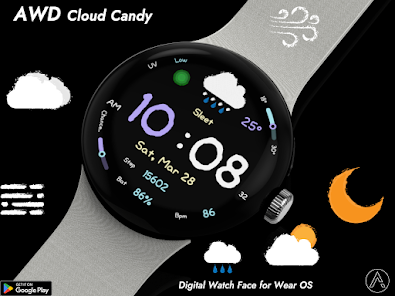


About this app
Readability: Large digital clock with a unique, friendly font.
Weather at a glance: Easy-to-understand icons for current conditions.
Daily Stats: Tracks your steps, heart rate, and battery level.
Simplicity: A minimalist layout that focuses on essential information.
Features
• Weather condition icon
• Temp , Low & High temperature progress bar
• UV indicator
• Step count
• Battery %
• Heart rate
• 12/24H
• Change of precipitation progress bar
• Day / Date
Customizing
Customization
• 16 Color style change
• Blingking ON/OFF
• 3 App shortcut
- Support wear OS
- Square screen watch mode is not supported.
***Installation Guide***
The mobile app guides you through the watch face installation process.
You can delete the mobile app once the watch face installation is complete.
1. Your watch and phone must be connected via Bluetooth.
2. Tap the "Install" button in the mobile guide app.
3. Follow the instructions to install the watch face. It will take only a few minutes.
You can also search for and install watch faces directly from the Google app on your watch.
You can also search for and install watch faces from a mobile web browser.
Send feedback : [email protected]
Weather at a glance: Easy-to-understand icons for current conditions.
Daily Stats: Tracks your steps, heart rate, and battery level.
Simplicity: A minimalist layout that focuses on essential information.
Features
• Weather condition icon
• Temp , Low & High temperature progress bar
• UV indicator
• Step count
• Battery %
• Heart rate
• 12/24H
• Change of precipitation progress bar
• Day / Date
Customizing
Customization
• 16 Color style change
• Blingking ON/OFF
• 3 App shortcut
- Support wear OS
- Square screen watch mode is not supported.
***Installation Guide***
The mobile app guides you through the watch face installation process.
You can delete the mobile app once the watch face installation is complete.
1. Your watch and phone must be connected via Bluetooth.
2. Tap the "Install" button in the mobile guide app.
3. Follow the instructions to install the watch face. It will take only a few minutes.
You can also search for and install watch faces directly from the Google app on your watch.
You can also search for and install watch faces from a mobile web browser.
Send feedback : [email protected]
Updated on
Safety starts with understanding how developers collect and share your data. Data privacy and security practices may vary based on your use, region, and age. The developer provided this information and may update it over time.

No data shared with third parties
Learn more about how developers declare sharing

No data collected
Learn more about how developers declare collection
App support
phone
Phone number
+821042465646
About the developer


