
Digital Informer: Watch face
4.4star
3.08K reviews
100K+
Downloads

Everyone
info


About this app
Only for Wear OS 4+ devices
Powered by Watch Face Format 4
amoledwatchfaces.com
BUY ONE GET ONE OFFER
amoledwatchfaces.com/bogo
CUSTOM COMPLICATION APPS
amoledwatchfaces.com/apps
FEATURES
Modern Aesthetics
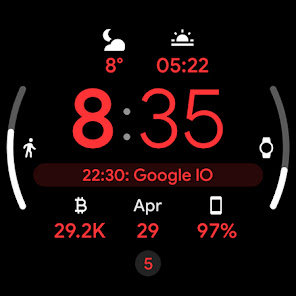
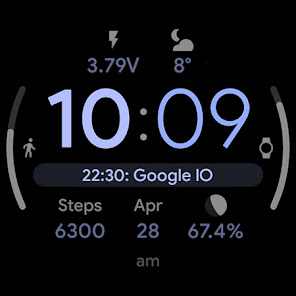
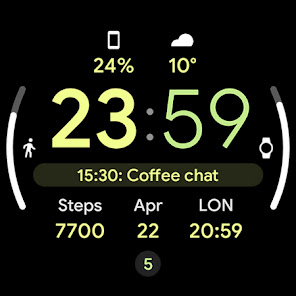
Crisp digital display with Material You design seamlessly blends with your device's theme. Choose from captivating mesh backgrounds.
Unmatched Customization
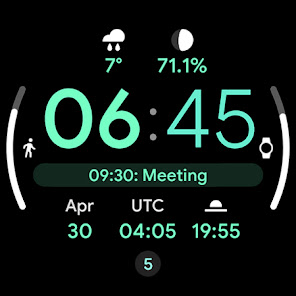
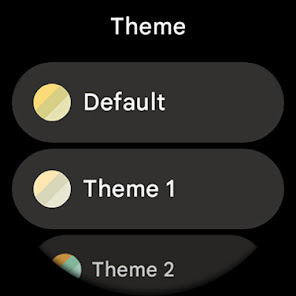
Explore 30+ color themes to match your mood or outfit. True black background ensures clarity and battery efficiency. High-resolution visuals shine on any smartwatch.
Enhanced Functionality
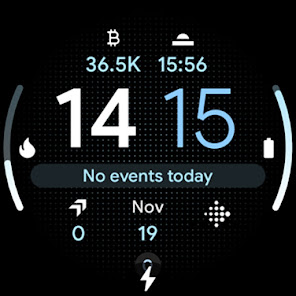
PNGQuant optimization keeps things smooth and battery-friendly. 8 customizable complications keep you informed at a glance. The unique ambient mode uses less power while maintaining a stylish display with adaptive color.
Express yourself. Stay informed. This watch face does it all.
USER CONFIGURATIONS
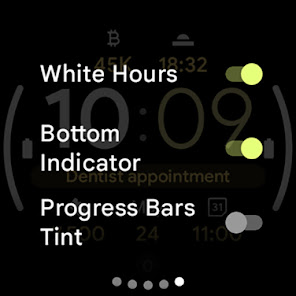
• White Hours (Toggle)
• Theme, SubTheme (30+)
• Mesh Background (5x)
• AOD (Style - 2x)
• Am-Pm-Notifications Indicator (Toggle)
• Bold Minutes (Toggle)
• Progress Bars Tint (Toggle)
• Custom complications
Installation and troubleshooting guide
amoledwatchfaces.com/guide
Please send any issues reports or help requests to our support address
[email protected]
Join our Telegram group for live support and discussion
t.me/amoledwatchfaces
Newsletter
amoledwatchfaces.com/contact#newsletter
amoledwatchfaces™ - Awf
Powered by Watch Face Format 4
amoledwatchfaces.com
BUY ONE GET ONE OFFER
amoledwatchfaces.com/bogo
CUSTOM COMPLICATION APPS
amoledwatchfaces.com/apps
FEATURES
Modern Aesthetics
Crisp digital display with Material You design seamlessly blends with your device's theme. Choose from captivating mesh backgrounds.
Unmatched Customization
Explore 30+ color themes to match your mood or outfit. True black background ensures clarity and battery efficiency. High-resolution visuals shine on any smartwatch.
Enhanced Functionality
PNGQuant optimization keeps things smooth and battery-friendly. 8 customizable complications keep you informed at a glance. The unique ambient mode uses less power while maintaining a stylish display with adaptive color.
Express yourself. Stay informed. This watch face does it all.
USER CONFIGURATIONS
• White Hours (Toggle)
• Theme, SubTheme (30+)
• Mesh Background (5x)
• AOD (Style - 2x)
• Am-Pm-Notifications Indicator (Toggle)
• Bold Minutes (Toggle)
• Progress Bars Tint (Toggle)
• Custom complications
Installation and troubleshooting guide
amoledwatchfaces.com/guide
Please send any issues reports or help requests to our support address
[email protected]
Join our Telegram group for live support and discussion
t.me/amoledwatchfaces
Newsletter
amoledwatchfaces.com/contact#newsletter
amoledwatchfaces™ - Awf
Updated on
Safety starts with understanding how developers collect and share your data. Data privacy and security practices may vary based on your use, region, and age. The developer provided this information and may update it over time.

No data shared with third parties
Learn more about how developers declare sharing

No data collected
Learn more about how developers declare collection
Ratings and reviews
4.1
1.43K reviews

Ben Moat
- Flag inappropriate
December 25, 2025
I love the customsation options. My favourite thing, which no other watch face app can reliably do, is show me my phone's percentage. I have noticed a bug with this where if you set one of the side progress bars to the phone's battery, it doesn't show the '%' suffix like it does with the watch progress bar battery. If it could be updated to be the same as the watch battery, that would be awesome!
3 people found this review helpful
amoledwatchfaces™
December 27, 2025
Hi Ben, thanks for your review. Be sure to enable 'Show Percentage' in Phone Battery Complication app settings. Sincerely, Tomas | amoledwatchfaces.com

Neil Laboske
- Flag inappropriate
April 26, 2024
This one is very nice. Areas for improvement: Color options - custom primary, secondary and tertiary color options, preferably with a color wheel selection and/or gradients. Too many pastel options. Also the option to apply colors to complication icons instead of the full color icons Complication changes - alarm option looks very bad when no alarm is set. I would like the option to change complication 8 to day & date so it is visible with the basic AOD. Thanks devs!
1 person found this review helpful
amoledwatchfaces™
April 26, 2024
Thanks for your review!!! We will be working on a new update soon. We will try to implement some of the feature proposals.
Tomas | amoledwatchfaces.com

B Independent
- Flag inappropriate
- Show review history
January 25, 2024
The best part of this is the number of complications (8). However, the complication slots 6 and 7 are somewhat useless; they would be more useful if there was a number instead of the shaded bar (e.g., it's better to know actual percentage of battery level than shaded approximation, the moon compilation shows 99.8% in a regular slot but is only half-shaded on the bar which suggests first or last quarter lunar phase). E: Adding star- developer is highly responsive & seeks constant improvement.
10 people found this review helpful
amoledwatchfaces™
January 25, 2024
Hello, Moon phase from Complications suite (RANGED_VALUE) shows full moon phase progress (28.5 days).
We will try to improve side complications in the future updates.
Tomas | amoledwatchfaces.com
What’s new
v1.3.5
• added wff4 watchface.xml
• switched fully to Google Sans Flex font
• adjusted complication text areas
v1.3.4 (Wear OS 5+)
• added Blinking Colon toggle
• fixed some default complication providers
• added 'Full White' color theme
• tapping Digital Clock now opens Alarm app
v1.3.3
• notifications row fix
...
NOTE: Please do a full reinstall in case there are some issues after recent update.
• added wff4 watchface.xml
• switched fully to Google Sans Flex font
• adjusted complication text areas
v1.3.4 (Wear OS 5+)
• added Blinking Colon toggle
• fixed some default complication providers
• added 'Full White' color theme
• tapping Digital Clock now opens Alarm app
v1.3.3
• notifications row fix
...
NOTE: Please do a full reinstall in case there are some issues after recent update.
App support
About the developer
Tomáš Marcinčin - amoledwatchfaces™
51 Nižný Kručov
09301 Nižný Kručov
Slovakia
+421 952 033 959


