Bitdefender Parental Control
2.4star
1.2K reviews
100K+
Downloads

Everyone
info
About this app
Bitdefender Parental Control offers digital help to parents and extra online safety to children.
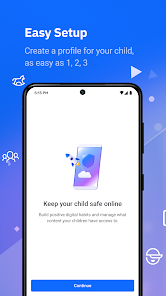
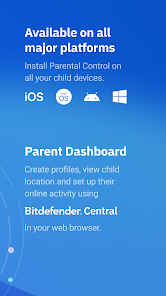
Download and install the Bitdefender Parental Control app across your children's devices to easily manage and monitor their online activities using the Bitdefender Central platform.
Set up healthy, age-appropriate online habits for your kids and review their activity with the array of features tailored to promote a balanced digital lifestyle while preventing overuse and exposure to inappropriate online content:
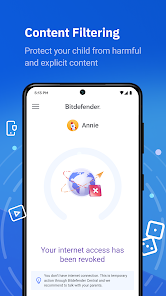
✔ Content filtering
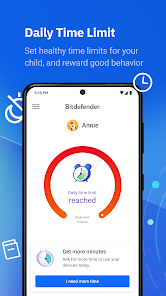
✔ Internet time management
✔ Location tracking
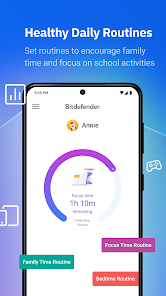
✔ Preset and customizable routines
✔ Rewards and Internet time extension
✔ Safe Search and YouTube restricted mode
Content filtering. Use the predefined, age-appropriate filtering categories to prevent exposure to inappropriate content or make your own adjustments to guide good online habits.
Internet time management. Control the allowed daily internet time limit across your child's devices and reward extra screen time for responsible online usage.
Location Tracking. Make sure your kids are OK even when they're not by your side. Track their location so you always know where they are.
Preset and customizable routines. Children strive when they have routines they can follow. You can set up Focus time, Family time and Bedtime routines to create a tailored schedule for each of these activities.
Safe Search and YouTube restricted. Remove explicit and harmful results from search engines and videos to ensure results are age-appropriate.
Note
Bitdefender Parental Control requires a VPN connection to provide Content Filtering and Safe Browsing functionalities.
The Device Administrator permission is also required to prevent uninstall.
Previous versions may require the Accessibility permission to monitor and manage browsing activity.
Download and install the Bitdefender Parental Control app across your children's devices to easily manage and monitor their online activities using the Bitdefender Central platform.
Set up healthy, age-appropriate online habits for your kids and review their activity with the array of features tailored to promote a balanced digital lifestyle while preventing overuse and exposure to inappropriate online content:
✔ Content filtering
✔ Internet time management
✔ Location tracking
✔ Preset and customizable routines
✔ Rewards and Internet time extension
✔ Safe Search and YouTube restricted mode
Content filtering. Use the predefined, age-appropriate filtering categories to prevent exposure to inappropriate content or make your own adjustments to guide good online habits.
Internet time management. Control the allowed daily internet time limit across your child's devices and reward extra screen time for responsible online usage.
Location Tracking. Make sure your kids are OK even when they're not by your side. Track their location so you always know where they are.
Preset and customizable routines. Children strive when they have routines they can follow. You can set up Focus time, Family time and Bedtime routines to create a tailored schedule for each of these activities.
Safe Search and YouTube restricted. Remove explicit and harmful results from search engines and videos to ensure results are age-appropriate.
Note
Bitdefender Parental Control requires a VPN connection to provide Content Filtering and Safe Browsing functionalities.
The Device Administrator permission is also required to prevent uninstall.
Previous versions may require the Accessibility permission to monitor and manage browsing activity.
Updated on
Safety starts with understanding how developers collect and share your data. Data privacy and security practices may vary based on your use, region, and age. The developer provided this information and may update it over time.

No data shared with third parties
Learn more about how developers declare sharing

This app may collect these data types
Location, Personal info and 4 others

Data is encrypted in transit

You can request that data be deleted
Ratings and reviews
2.3
1.04K reviews

Simon Neil Scott
- Flag inappropriate
- Show review history
November 30, 2025
Doesn't appear to work on Google Pixel 7 Pro. Continual warning that it needs to be updated in Bitdefender Central, OR my restricted profile appears to vanish on the Central website, to then return soon after, and restricted content is accessible on phone when it shouldn't be. Then the app appears to block content it shouldn't, such as the BBC and other perfectly safe websites and internet traffic for messages. I've ultimately removed it, as it's impeding internet access when it shouldn't.
Bitdefender
December 2, 2025
Sorry for the trouble you’ve experienced. Please contact us at [email protected] so we can help resolve the issues with your Pixel 7 Pro and improve your experience.

M
- Flag inappropriate
June 25, 2022
For iPhone 12 mini an app is not tracking almost anything, only phone contacts of the child. Customer service response time is longer than a week with general information, which doesn't resolve an issue. Response usually would say that an app might not work for all models. If an app is not suitable for iPhone, which is widely used globally than what is the point to offer this kind of service.
9 people found this review helpful
Bitdefender
July 1, 2022
Hello, did your problem get resolved? If not, we are here to help you! Please do let us know at [email protected].

A Google user
- Flag inappropriate
October 13, 2019
I am a bitdefender user. I paid for the annual subscription. I thought your parental app would be better than google family link. I was wrong. 1. It can be uninstalled easily 2. It can be deactivated by turning off accessibility and using battery optimizer to not run it in the background. 3. It doesnt work - i tried setting it up on 2 gadgets. Both screentime and daily usage feature did not work. Even the locate feature doesnt work. I tried this on android phones running on android 8 and 9.
65 people found this review helpful
Bitdefender
October 13, 2019
Hi Migis. Sorry to hear that you had a negative experience with our app. If you wish you can send us an email at [email protected] so that we can assist you as best as we can. Thank you and have a great day ahead!
What’s new
This version brings improvements on the way Parental Control monitoring and management is applied.
With the new network filtering capabilities, you will be able to easily choose the restricted categories and manage the online activities and time your child is allowed to have across their devices.
With the new network filtering capabilities, you will be able to easily choose the restricted categories and manage the online activities and time your child is allowed to have across their devices.
App support
About the developer
BITDEFENDER SRL
SOS. ORHIDEELOR NR. 15A , SECTORUL 6
060071 Bucuresti
Romania
+40 784 132 862


