ECOVACS HOME
4.6star
83.6K reviews
5M+
Downloads

Everyone
info

About this app
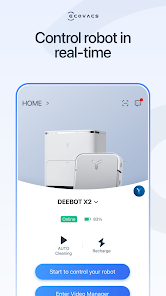
ECOVACS HOME debuts! With awesome connected features, our latest App allows you to control your DEEBOT anytime, anywhere, and takes your cleaning experience to a new level.
By connecting to your DEEBOT, you can:
• Start, pause, or stop cleaning
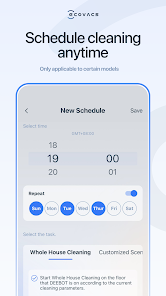
• Set a regular cleaning schedule
• Set voice report, suction power, and Do-Not-Disturb time*
• Receive notifications from your Wi-Fi enabled robot*
• Share DEEBOT with your friends through multiple accounts*
• Receive software and firmware updates*
• Access instruction manuals, video tutorials and FAQs, and contact customer service
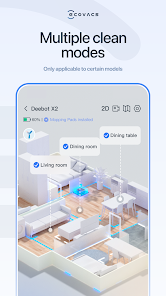
And you can do much more with your advanced mapping DEEBOT (powered by Smart Navi™ Technology):
• Set up Virtual Boundary™ to create no-go zones*
• Use Custom Cleaning to customize any cleaning area you want*
• View real-time stats from the visual map of your home, areas cleaned, and cleaning time*
• Adjust water flow level when DEEBOT is mopping (Robots with mopping function only)*
*Features vary with models. Go to ecovacs.com to see detailed features of your model.
*** App permissions***
The application service requires the following permissions on your phone. For optional permissions, if they are not accessed, the related features will not be available, but it will not affect the basic using of the App.
[Required Permissions]
/
[Optional Permissions]
-Location: Used for device networking, discovering nearby devices, and obtaining WiFi information currently connected to the mobile device.
-Camera: Scan the QR code on the Robot for networking, and scan the sharing code for device sharing.
-Photos and Videos(Storage): Used for changing profile pictures, posting image comments, and online customer service providing feedback via images.
-Microphone: Audio and video call feature for customer service and Robot Video Manager.
-Bluetooth: Used for connecting devices via Bluetooth, enabling network configuration and robot controlling.
-Nearby Devices: Used for scanning and discovering nearby Bluetooth devices during network configuration.
-WLAN: Used for connecting to the Wi-Fi hotspot emitted by the device for network configuration.
-Notifications: Used for sending device and system notification messages to users.
-Local Network: Used to enable local network access on iOS devices, allowing connection to the Wi-Fi hotspot released by the device during network configuration.
-Music and audio: Audio and video call feature for customer service and Robot Video Manager.
Plus, you can control your DEEBOT with simple commands through Amazon Alexa and Google Home**.
**Smart Home commands are available only in some countries/regions.
Requirements:
Wi-Fi with 2.4 GHz or 2.4/5 GHz mixed band support only
Mobile device with Android 4.4 or later
Need help? Visit ecovacs.com for more information or to contact our customer service team.
By connecting to your DEEBOT, you can:
• Start, pause, or stop cleaning
• Set a regular cleaning schedule
• Set voice report, suction power, and Do-Not-Disturb time*
• Receive notifications from your Wi-Fi enabled robot*
• Share DEEBOT with your friends through multiple accounts*
• Receive software and firmware updates*
• Access instruction manuals, video tutorials and FAQs, and contact customer service
And you can do much more with your advanced mapping DEEBOT (powered by Smart Navi™ Technology):
• Set up Virtual Boundary™ to create no-go zones*
• Use Custom Cleaning to customize any cleaning area you want*
• View real-time stats from the visual map of your home, areas cleaned, and cleaning time*
• Adjust water flow level when DEEBOT is mopping (Robots with mopping function only)*
*Features vary with models. Go to ecovacs.com to see detailed features of your model.
*** App permissions***
The application service requires the following permissions on your phone. For optional permissions, if they are not accessed, the related features will not be available, but it will not affect the basic using of the App.
[Required Permissions]
/
[Optional Permissions]
-Location: Used for device networking, discovering nearby devices, and obtaining WiFi information currently connected to the mobile device.
-Camera: Scan the QR code on the Robot for networking, and scan the sharing code for device sharing.
-Photos and Videos(Storage): Used for changing profile pictures, posting image comments, and online customer service providing feedback via images.
-Microphone: Audio and video call feature for customer service and Robot Video Manager.
-Bluetooth: Used for connecting devices via Bluetooth, enabling network configuration and robot controlling.
-Nearby Devices: Used for scanning and discovering nearby Bluetooth devices during network configuration.
-WLAN: Used for connecting to the Wi-Fi hotspot emitted by the device for network configuration.
-Notifications: Used for sending device and system notification messages to users.
-Local Network: Used to enable local network access on iOS devices, allowing connection to the Wi-Fi hotspot released by the device during network configuration.
-Music and audio: Audio and video call feature for customer service and Robot Video Manager.
Plus, you can control your DEEBOT with simple commands through Amazon Alexa and Google Home**.
**Smart Home commands are available only in some countries/regions.
Requirements:
Wi-Fi with 2.4 GHz or 2.4/5 GHz mixed band support only
Mobile device with Android 4.4 or later
Need help? Visit ecovacs.com for more information or to contact our customer service team.
Updated on
Safety starts with understanding how developers collect and share your data. Data privacy and security practices may vary based on your use, region, and age. The developer provided this information and may update it over time.

No data shared with third parties
Learn more about how developers declare sharing

This app may collect these data types
Personal info, Financial info and 2 others

Data is encrypted in transit

You can request that data be deleted
Ratings and reviews
4.6
81.3K reviews

Aaron Castro
- Flag inappropriate
February 12, 2026
Unfortunately the experience I've had with this app and the robot vac is not good. The vac gets stuck constantly, loses its place, and gets tangled all the time. I made restricted areas on the map so the vac wouldn't go there... It still goes there and gets stuck all the time. My main issue with the app is the map. I do a full scan of my house and a few days later, it scans again over it. So now there are 2 or 3 maps over my original map. Many other issues. Do not recommend it at all.
8 people found this review helpful

I'mAlright WithMe
- Flag inappropriate
January 4, 2026
The Ecovacs Home app ONLY has 3 stars, the Ecovacs products, however, get ALL 5 stars! The app leaves much to be desired. Beyond connecting to WiFi and the simple tasks, the app for both of the systems I've owned would not cooperate with the apps interface properly. I could never get either to work by voice command or the "Okay Yiko" part of the program. App, simple and easy to use outside of the bells and whistles. Sweep, mop and even adds its own soap.
2 people found this review helpful

Valentina Chaikina
- Flag inappropriate
March 10, 2026
The robot itself is great, but constant problems with this program (map disappears, can't find selected area to clean) makes the entire experience terrible. Everything was good 1st year, 2nd year I had to restore map ones in a while it was still acceptable. But ones 3rd year has started (and warranty over) it can't complete a single cleaning cycle without my attention. Support team suggested me buying a new robot. What a great deal buying a $1000 product that works only for 2 years!
2 people found this review helpful
What’s new
Optimization | Updated error code styles in Video Manager
Optimization | Upgraded member name and membership level indicators
Optimization | Added support for ad redirects on product detail pages
Optimization | Upgraded member name and membership level indicators
Optimization | Added support for ad redirects on product detail pages
App support
About the developer
Ecovacs Robotics, Inc.
1820 Gateway Dr Ste 360
San Mateo, CA 94404-4058
United States
+86 139 6252 1224


