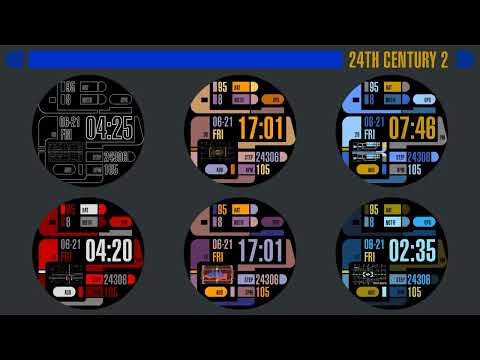

TREK: 24th Century Watch v2

4.8star
43 reviews

Everyone
info
5K+
Downloads

Everyone
Learn more


About this app
Animated Watch Face with Customizable Regular + Always On Displays in 24th Century style. This is for Wear OS and Wear OS based smartwatches.
Mix & Match:
• 5 backgrounds
• 10 animations
• 10 text color themes
After installing, open your Wear app and it will be in your watch face list to be applied. See the Play Store listing's screenshot or video for list of functions/information displayed.
To customize, long press your watch face and choose the customize option. Then swipe up/down/left/right through the customization options. You can also do this easier in your phone's Wear app.
This watch face's interface is meant to parody the way sci-fi designers on a cheap budget imagined future computers over 30 years ago. Made with cones, curves, and various blocks in the basic colors computers were capable of at the time. Topped with tiny text that was meaningless and buttons with completely indecipherable function or layout.
I stayed true to that style, but for my artistic expression, I took something so ridiculous, counter-intuitive, and nonsensical, and transformed it into something smart. I gave it actual meaning and function to make it readable and functional.
This is a generic interface that uses only public domain simple curves, colors, rectangles, etc. and contains no trademarked material from any old - games, computer programs, shows or movies. I respect copyrights, so please don't ask me to update to include them in reviews or by mail.
↑ ★ ★ ★ ★ ★ ↑
Light up the stars :-) It helps me.
Like and follow my Facebook page for the latest releases and updates. https://www.facebook.com/Not.Star.Trek.LCARS.Apps/
Also click on my developer name "NSTEnterprises" at the top to see my other offerings.
Mix & Match:
• 5 backgrounds
• 10 animations
• 10 text color themes
After installing, open your Wear app and it will be in your watch face list to be applied. See the Play Store listing's screenshot or video for list of functions/information displayed.
To customize, long press your watch face and choose the customize option. Then swipe up/down/left/right through the customization options. You can also do this easier in your phone's Wear app.
This watch face's interface is meant to parody the way sci-fi designers on a cheap budget imagined future computers over 30 years ago. Made with cones, curves, and various blocks in the basic colors computers were capable of at the time. Topped with tiny text that was meaningless and buttons with completely indecipherable function or layout.
I stayed true to that style, but for my artistic expression, I took something so ridiculous, counter-intuitive, and nonsensical, and transformed it into something smart. I gave it actual meaning and function to make it readable and functional.
This is a generic interface that uses only public domain simple curves, colors, rectangles, etc. and contains no trademarked material from any old - games, computer programs, shows or movies. I respect copyrights, so please don't ask me to update to include them in reviews or by mail.
↑ ★ ★ ★ ★ ★ ↑
Light up the stars :-) It helps me.
Like and follow my Facebook page for the latest releases and updates. https://www.facebook.com/Not.Star.Trek.LCARS.Apps/
Also click on my developer name "NSTEnterprises" at the top to see my other offerings.
Updated on
Safety starts with understanding how developers collect and share your data. Data privacy and security practices may vary based on your use, region, and age. The developer provided this information and may update it over time.

No data shared with third parties
Learn more about how developers declare sharing

No data collected
Learn more about how developers declare collection
Ratings and reviews
4.7
16 reviews

Kris Diehl
- Flag inappropriate
March 24, 2026
Looks great, but the standby mode is completely unreadable, most egregiously on the time itself. Just make the time filled in for standby so you can read it. A couple options to change date format and complications and button targets would be nice as well.

Jo Gardner
- Flag inappropriate
September 11, 2025
I love almost everything about this face, it's easy to read and has all the info I need at a glance, and the colour choices stay true to the trek theme. The one thing I don't like, is not being able to choose which way the date is displayed, most of the world uses dd/mm option rather than the American way of putting the month first. It would be nice if that was included in any future updates for the non-US users.
5 people found this review helpful
NSTEnterprises
September 11, 2025
I can't remember off hand if I did with this theme, but on several I changed the date format like that when viewing in 24h mode instead of 12h mode. I understand Europe does it different, but in my country we do same as America. American's are the #1 customer by far, so I cater more to them. But I do default temperature to Celsius ;-)

Nicholas Brinley
- Flag inappropriate
December 24, 2025
looks awesome, if I could adjust some of the data, for example from BPM to weather it would be perfect.
What’s new
Now has a companion app to make installing the watch face to your connected watch easier.


