Cogeco Wi-Fi
1.2star
720 reviews
100K+
Downloads

Everyone
info
About this app
Note: Please see the requirements section below to determine if you are eligible to use this app with your Cogeco Internet service.
App Features:
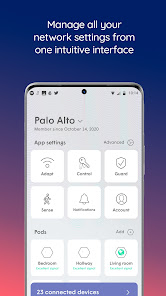
- Easily manage your Wi-Fi network name and password. View or update your Wi-Fi credentials, and even share them through text or email
- Keep your devices protected from online threats around the clock with our Guard™ security features
- Block ads from known ad servers automatically, significantly improving your browsing experience
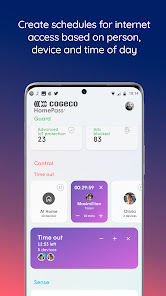
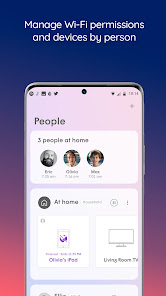
- Create customized user profiles for everyone in your household. Set up custom alerts to notify you when people leave or return home.
- Keep informed about which people and devices are connected to your network, even when you are not at home.
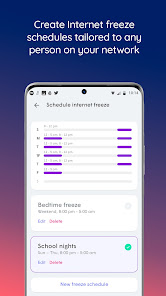
- Pause the Internet connection to any device at any time. Configure customized Internet Freeze Schedules to limit access to approved time periods.
Requirements:
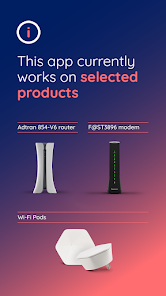
• Residential customers using one or more of the following device models: F@ST3896 modem, Adtran 854-V6 router, Cogeco Wi-Fi Pods.
• Logging into the app requires your Cogeco My Account username and password
• App intended for use on smartphones only"
- Magically simple to set up
Plug in your pods and let the system go to work. Cogeco recognizes all of your devices, identifies the flow of traffic, and starts to optimize your home network. The smartphone app helps you manage the setup with a few quick taps.
- Guest access & parental controls
Personalize guest access with custom passwords. Set age-appropriate content filters, manage website access, and even pause the Internet.
- Guard™
Protect your home network and connected devices from hackers and cybercriminals. Using advanced security features powered by AI, Cogeco helps keep your connected home safe.
- Adblocking
Cogeco blocks the ad content coming from known ad servers, significantly improving your browsing experience.
- Manage your network like a pro
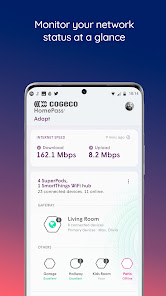
As people and devices come and go in your house, Cogeco lets you see which devices are accessing the Internet and how much they’re uploading or downloading. You can block and unblock specific devices from accessing the Internet.
- Efficient automatic updates
We auto-update the firmware when network activity is low, usually at night. You can also schedule it for another time that works best for you.
- New features
Get the latest security features and performance improvements to stay ahead of cyber threats and enhance your in-home internet experience.
- Grows with your needs
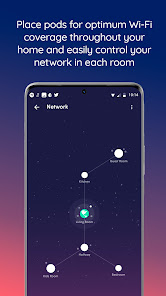
Easily expand the coverage by adding additional pods right from the home screen. Continue to enjoy seamless Wi-Fi in every room, on every device.
App Features:
- Easily manage your Wi-Fi network name and password. View or update your Wi-Fi credentials, and even share them through text or email
- Keep your devices protected from online threats around the clock with our Guard™ security features
- Block ads from known ad servers automatically, significantly improving your browsing experience
- Create customized user profiles for everyone in your household. Set up custom alerts to notify you when people leave or return home.
- Keep informed about which people and devices are connected to your network, even when you are not at home.
- Pause the Internet connection to any device at any time. Configure customized Internet Freeze Schedules to limit access to approved time periods.
Requirements:
• Residential customers using one or more of the following device models: F@ST3896 modem, Adtran 854-V6 router, Cogeco Wi-Fi Pods.
• Logging into the app requires your Cogeco My Account username and password
• App intended for use on smartphones only"
- Magically simple to set up
Plug in your pods and let the system go to work. Cogeco recognizes all of your devices, identifies the flow of traffic, and starts to optimize your home network. The smartphone app helps you manage the setup with a few quick taps.
- Guest access & parental controls
Personalize guest access with custom passwords. Set age-appropriate content filters, manage website access, and even pause the Internet.
- Guard™
Protect your home network and connected devices from hackers and cybercriminals. Using advanced security features powered by AI, Cogeco helps keep your connected home safe.
- Adblocking
Cogeco blocks the ad content coming from known ad servers, significantly improving your browsing experience.
- Manage your network like a pro
As people and devices come and go in your house, Cogeco lets you see which devices are accessing the Internet and how much they’re uploading or downloading. You can block and unblock specific devices from accessing the Internet.
- Efficient automatic updates
We auto-update the firmware when network activity is low, usually at night. You can also schedule it for another time that works best for you.
- New features
Get the latest security features and performance improvements to stay ahead of cyber threats and enhance your in-home internet experience.
- Grows with your needs
Easily expand the coverage by adding additional pods right from the home screen. Continue to enjoy seamless Wi-Fi in every room, on every device.
Updated on
Safety starts with understanding how developers collect and share your data. Data privacy and security practices may vary based on your use, region, and age. The developer provided this information and may update it over time.


Ratings and reviews
1.2
692 reviews

Dan M
- Flag inappropriate
- Show review history
September 22, 2024
The app is useless! I want to be able to remove devices permanentaly not just freeze them. I also have devices which I don't know what they are. And yes, I know how to secure my network. I have seen other comments from people in other platforms with the same issues. I also want to be able to change my router password but I can't find where to do this. Should go back to being able to control the router like it used to be through a browser. I may just purchase my own router instead!
18 people found this review helpful
Plume Design, Inc.
September 23, 2024
Hi, Dan. Thank you for the feedback. We'll consider this feedback for future modifications. Also, here is the walkthrough for changing your WiFi password: https://support.cogeco.ca/hc/en-ca/articles/1500008419941. If you prefer a Modem with a GUI through a browser, we can assist with a private/direct message: https://www.cogeco.ca/en/socialmedia.

Lord Krieg splosion
- Flag inappropriate
August 14, 2023
My God, what a frustrating experience. I am unsure if it's just because I am using a Google pixel phone or that they can't make a functional app. It never seems to save your information so you constantly need to login into the app if you can even get the login page to load. Half the time is just gives you loading wheels of doom or the app just crashes hard. It's quite hard to see the reason to push self installs when the common consumer can't get the "APP" to work!
11 people found this review helpful

Dakota
- Flag inappropriate
July 8, 2022
Can't log into app, similar to other complaints. After entering my login information, it returns me back to the splash screen telling me all the "cool" features the app has, that I cannot access. When I attempt to log back in, it hasn't kept any of my username information (even though I've told it to remember me). Don't even "please reach out" me, this is an issue that I've seen other people complain about and you've apparently done nothing to fix the problem.
20 people found this review helpful
Plume Design, Inc.
July 10, 2022
Hi, Dakota. If you have the Cogeco Wi-Fi pods, and are still unable to login to this app, please contact our tech support team at bit.ly/2Rz6mIz to troubleshoot. That shouldn't be happening. Thank you. - Sandra Cogeco
What’s new
Bug fixes
App support
About the developer
Plume Design, Inc.
325 Lytton Ave Ste 200
Palo Alto, CA 94301
United States
+1 312-933-9298


