
Genius Scan Enterprise
In-app purchases
4.9star
10.2K reviews
100K+
Downloads

Everyone
info




About this app
Genius Scan is a scanner app that turns your device into a scanner, lets you quickly scan your paper documents on the go and export them as multi-scan PDF files.
*** 20+ million users and 1000s of small businesses use the Genius Scan scanner app ***
The Genius Scan scanner app will replace your desktop scanner and you will never look back.
== KEY FEATURES ==
Smart Scanning:
The Genius Scan scanner app includes all the features to make great scans.
- Document detection & background removal
- Distortion correction
- Shadow removal and defect cleanup
- Batch scanner
PDF Creation & Editing:
Genius Scan is the best PDF scanner. Scan not just to images, but full PDF documents.
- Combine scans into PDF documents
- Document merging & splitting
- Multi-page PDF creation
Security & Privacy:
A scanner app that preserves your privacy.
- On-device document processing
- Biometric unlock
- PDF encryption
Scan Organization:
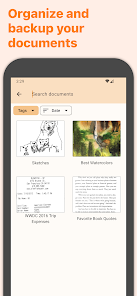
More than just a PDF scanner app, Genius Scan also lets you organize your scans.
- Document tagging
- Metadata and content search
- Smart document renaming (custom templates, …)
- Backup and multi-device sync
Export:
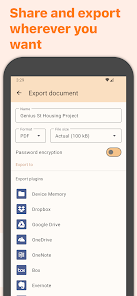
Your scans aren't stuck in your scanner app, you can export them to any other app or services you use.
- Email
- Box, Dropbox, Evernote, Expensify, Google Drive, OneDrive, FTP, WebDAV.
- Any WebDAV compatible service.
OCR (Text Recognition):
In addition to scanning, this scanner app gives you additional understanding of your scans.
+ Extract text from each scan
+ Searchable PDF creation
== ABOUT US ==
It’s in the heart of Paris, France that The Grizzly Labs develops the Genius Scan scanner app. We hold ourselves to the highest standards in terms of quality and privacy.
*** 20+ million users and 1000s of small businesses use the Genius Scan scanner app ***
The Genius Scan scanner app will replace your desktop scanner and you will never look back.
== KEY FEATURES ==
Smart Scanning:
The Genius Scan scanner app includes all the features to make great scans.
- Document detection & background removal
- Distortion correction
- Shadow removal and defect cleanup
- Batch scanner
PDF Creation & Editing:
Genius Scan is the best PDF scanner. Scan not just to images, but full PDF documents.
- Combine scans into PDF documents
- Document merging & splitting
- Multi-page PDF creation
Security & Privacy:
A scanner app that preserves your privacy.
- On-device document processing
- Biometric unlock
- PDF encryption
Scan Organization:
More than just a PDF scanner app, Genius Scan also lets you organize your scans.
- Document tagging
- Metadata and content search
- Smart document renaming (custom templates, …)
- Backup and multi-device sync
Export:
Your scans aren't stuck in your scanner app, you can export them to any other app or services you use.
- Box, Dropbox, Evernote, Expensify, Google Drive, OneDrive, FTP, WebDAV.
- Any WebDAV compatible service.
OCR (Text Recognition):
In addition to scanning, this scanner app gives you additional understanding of your scans.
+ Extract text from each scan
+ Searchable PDF creation
== ABOUT US ==
It’s in the heart of Paris, France that The Grizzly Labs develops the Genius Scan scanner app. We hold ourselves to the highest standards in terms of quality and privacy.
Updated on
Safety starts with understanding how developers collect and share your data. Data privacy and security practices may vary based on your use, region, and age. The developer provided this information and may update it over time.


Ratings and reviews
4.9
9.83K reviews

Scott Abbott
- Flag inappropriate
January 7, 2026
Works well for the most part. Constant nags to upgrade to various levels of subscription are infuriating. Even more frustrating is the recent UI change. There is now a "files" button on the lower right corner. I will never have any use for it, but taking a picture / scan without hitting it accidentally and leaving the camera entirely is pretty much impossible. This alone is so aggravating that I'm looking for an alternative app.
1 person found this review helpful
The Grizzly Labs
January 8, 2026
Hi Scott, thank you for your feedback. We will closely monitor if other users encounter the same issue with the new "Photos" and "Files" button at the bottom of the scanning screen and try to improve the UI if necessary.

Ari Metzger
- Flag inappropriate
September 23, 2020
I originally got this app for taking receipt images for expense reimbursements at work, which it was great for. But I've found it comes in handy for way more than I expected. It's very easy to use, and gives you a lot of options for storing, sharing, and exporting files. I use it for all of my scanning needs and also for helping keep track of important things I might need to access a copy of (like my driver's license or insurance card).
25 people found this review helpful

Sara Davis
- Flag inappropriate
Apr 13, 2026
I love this app. It's great for scanning documents on the go, and I've recently begun using it to digitize my hard-copy photos. That, however, leads to the reason it's only getting 4 stars, rather than 5. While the app lets me scan the front and back side of the photos into one scan file, it won't let me import those scans as JPEG, only PDF. The hand-written notes on the back are just as important as the photos. Is there any way to enable multi-page sharing in JPEG?
27 people found this review helpful
What’s new
New export plugins for Gmail and Outlook have been added: this allows automatically exporting documents with these email services, just like other supported cloud services.
We've also added the ability to quickly share text of a document: after OCR has run, open the document text content and use the Share button.
When exporting to OneDrive, all shared items may not be visible in the folder picker. We've added a warning with a dedicated help article.
We've also added the ability to quickly share text of a document: after OCR has run, open the document text content and use the Share button.
When exporting to OneDrive, all shared items may not be visible in the folder picker. We've added a warning with a dedicated help article.
App support
About the developer


