
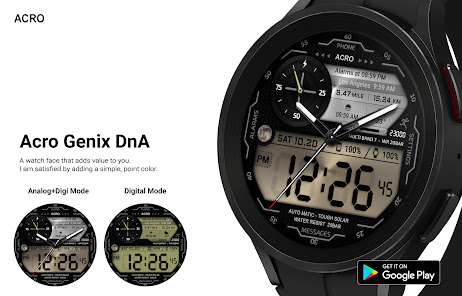
Acro Genix DnA Digi Watchface
4.6star
123 reviews
5K+
Downloads

Everyone
info




About this app
*How to install
Payment and installation of the Play Store app on the smartphone
(touch the triangle button next to the install button, select the watch and install)
Payment and installation of the Play Store app on the smartphone (touch the right arrow and install the smart watch)
> Need to check the connection between watch device and mobile phone
*Resolved to be installed display
Copy the play store address of the watch face (click the three dots next to the magnifying glass in the upper right corner of the play store > share)
Go to Samsung Internet and click 'Install on another device' > select watch 4
------------------------------------------------------
- In order to use all functions, consent to use the sensor is required.
- Some features may not be available on all watches.
- If the Play Store app is shown as incompatible, please install it using a web web browser on your PC/laptop in addition to the app on your phone.
- this watchface supports wear os devices.
------------------------------------------------------
Mobile phone battery complication app
After installing the additional app from the link below to your watch and smartphone, set the complication.
Search for the 'Phone Battery Complication' app and install it. /store/apps/details?id=com.weartools.phonebattcomp
All credits go to original app creator.
amoledwatchfaces - /store/apps/dev?id=5591589606735981545
Find installed watchfaces
1. Press and hold the watch face > 2. Click the Decorate button > 3. Click ‘Add watch face’ on the last right > Confirm the purchased watch face
How to set up Customize
1. Press and hold the watch face > 2. Click the Decorate button > 3. Tap each complication area to set the corresponding information > 4. Click OK
Discover the new watch face in the ACRO store
/store/apps/dev?id=7728319687716467388
For inquiries about the app, please contact us at the email below.
Mail : [email protected]
Payment and installation of the Play Store app on the smartphone
(touch the triangle button next to the install button, select the watch and install)
Payment and installation of the Play Store app on the smartphone (touch the right arrow and install the smart watch)
> Need to check the connection between watch device and mobile phone
*Resolved to be installed display
Copy the play store address of the watch face (click the three dots next to the magnifying glass in the upper right corner of the play store > share)
Go to Samsung Internet and click 'Install on another device' > select watch 4
------------------------------------------------------
- In order to use all functions, consent to use the sensor is required.
- Some features may not be available on all watches.
- If the Play Store app is shown as incompatible, please install it using a web web browser on your PC/laptop in addition to the app on your phone.
- this watchface supports wear os devices.
------------------------------------------------------
Mobile phone battery complication app
After installing the additional app from the link below to your watch and smartphone, set the complication.
Search for the 'Phone Battery Complication' app and install it. /store/apps/details?id=com.weartools.phonebattcomp
All credits go to original app creator.
amoledwatchfaces - /store/apps/dev?id=5591589606735981545
Find installed watchfaces
1. Press and hold the watch face > 2. Click the Decorate button > 3. Click ‘Add watch face’ on the last right > Confirm the purchased watch face
How to set up Customize
1. Press and hold the watch face > 2. Click the Decorate button > 3. Tap each complication area to set the corresponding information > 4. Click OK
Discover the new watch face in the ACRO store
/store/apps/dev?id=7728319687716467388
For inquiries about the app, please contact us at the email below.
Mail : [email protected]
Updated on
Safety starts with understanding how developers collect and share your data. Data privacy and security practices may vary based on your use, region, and age. The developer provided this information and may update it over time.

No data shared with third parties
Learn more about how developers declare sharing

No data collected
Learn more about how developers declare collection
Ratings and reviews
4.6
112 reviews

Michael Greenwood
- Flag inappropriate
June 6, 2025
I like hybrid faces in general, and this one is no exception. It's a beautiful and functional watch face. My biggest critique here is about the AOD. The AOD should be the bare minimum which should just the time. That can be done with a digital time, or just the hands showing. This face shows everything, but just dimmed down. I suspect that will reduce my battery life substantially. If that is the case, I won't be able to use this face.
1 person found this review helpful

Charley McCollum
- Flag inappropriate
- Show review history
February 9, 2023
This face works very well. Looks clean and displays a lot of information. The only issue I have is that the heart rate is only showing 0 and not updating. Would be 5 stars if the heart rate worked. Had to uninstall and then reinstall for it to work, I had hit the accept on the permissions originally. Now that everything is working this is my favorite face. Good information and getting more battery life than with my previous face. Thank you
ACROWatch
February 9, 2023
Heart rate operation requires sensor consent upon installation
Accept the sensor agreement and touch the heart rate icon to see your current heart rate. If the heart rate cannot be measured, select another pace in the decoration settings and select it again and try the measurement.
thank you

Aswin P
- Flag inappropriate
September 12, 2023
The best looking and most useful Watch face from your list. But please add an option to disable/remove Heart rate, it would save battery as many don't use it. And adding option to customise the default shortcuts would make this the best Watch face in playstore.
2 people found this review helpful
App support
About the developer


