

AWD SIGNATURE W watchface

4.8star
30 reviews
1K+
Downloads

Everyone
info





About this app
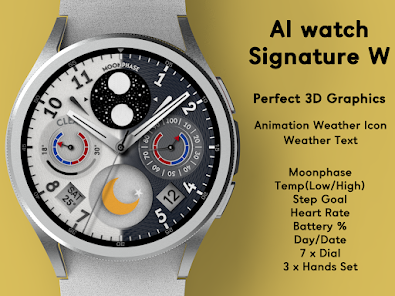
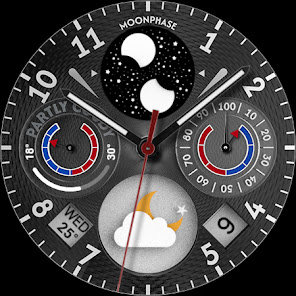
A modern analog watch face made in a perfect 3D format.
It has all the features you can easily see on your Wear OS device.
The perfect watch face for those who prefer realistic graphic design.
Easily check the weather and health information.
It offers 7 background styles and 3 hand styles.
Decorate your watch face with a new one every day.
Function
- Real 3D Graphics
- Animated Weather Icon
- Temperature (Celsius, Fahrenheit support)
- Temp(Low/High) ProgressBar
- Moonphase
- Step Goal
- Battery Percent
- HeartRate
(The weather updates automatically every 30 minutes. To update manually: Access the Weather or UV complication and press the Update button at the bottom.)
Weather information may not be displayed after restarting the watch.
In this case, apply the default watch face, then reapply the Weather watch face.
The weather information will then be displayed correctly.
Customizing
- 8 x Dial Style Change
- 4 x Hands Style Change
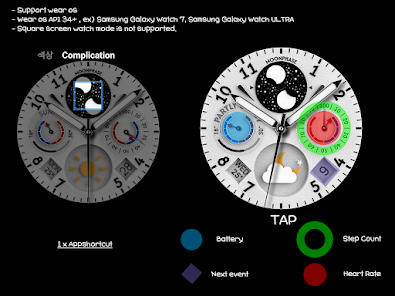
- 1 x Appshortcut
- Support wear OS
- Square screen watch mode is not supported.
***Installation Guide***
The mobile app guides you through the watch face installation process.
You can delete the mobile app once the watch face installation is complete.
1. Your watch and phone must be connected via Bluetooth.
2. Tap the "Install" button in the mobile guide app.
3. Follow the instructions to install the watch face. It will take only a few minutes.
You can also search for and install watch faces directly from the Google app on your watch.
You can also search for and install watch faces from a mobile web browser.
Send feedback : [email protected]
It has all the features you can easily see on your Wear OS device.
The perfect watch face for those who prefer realistic graphic design.
Easily check the weather and health information.
It offers 7 background styles and 3 hand styles.
Decorate your watch face with a new one every day.
Function
- Real 3D Graphics
- Animated Weather Icon
- Temperature (Celsius, Fahrenheit support)
- Temp(Low/High) ProgressBar
- Moonphase
- Step Goal
- Battery Percent
- HeartRate
(The weather updates automatically every 30 minutes. To update manually: Access the Weather or UV complication and press the Update button at the bottom.)
Weather information may not be displayed after restarting the watch.
In this case, apply the default watch face, then reapply the Weather watch face.
The weather information will then be displayed correctly.
Customizing
- 8 x Dial Style Change
- 4 x Hands Style Change
- 1 x Appshortcut
- Support wear OS
- Square screen watch mode is not supported.
***Installation Guide***
The mobile app guides you through the watch face installation process.
You can delete the mobile app once the watch face installation is complete.
1. Your watch and phone must be connected via Bluetooth.
2. Tap the "Install" button in the mobile guide app.
3. Follow the instructions to install the watch face. It will take only a few minutes.
You can also search for and install watch faces directly from the Google app on your watch.
You can also search for and install watch faces from a mobile web browser.
Send feedback : [email protected]
Updated on
Safety starts with understanding how developers collect and share your data. Data privacy and security practices may vary based on your use, region, and age. The developer provided this information and may update it over time.

No data shared with third parties
Learn more about how developers declare sharing

No data collected
Learn more about how developers declare collection
What’s new
Animation Fix
App support
phone
Phone number
+821042465646
About the developer


