D350 Galaxy Space Watch Face
4.0star
23 reviews
1K+
Downloads

Everyone
info


About this app
D350 Galaxy Space Watch Face for Wear OS
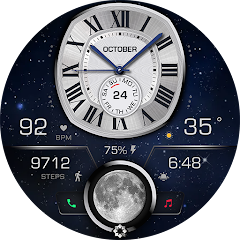
A stunning analog watch face inspired by galaxy and space visuals. Designed with glowing celestial details, essential fitness stats, moon phase tracking, and deep customization options for everyday use.
🔧 Main Features
• Analog watch face (12/24-hour format)
• Steps count
• Day of month + weekday
• Moon phase indicator
• Heart rate measurement
Tap the heart rate number to measure
Ensure the watch is worn & screen is ON during measurement
A measuring icon will appear while detecting your BPM
Requires heart rate permission
After manual measurement, BPM updates automatically every 10 minutes
• 2 customizable data fields
Examples: sunrise, next event, time zone, weather, barometer, and more
• Battery level indicator
• Changeable background (tap & hold to customize colors)
• Quick access to phone and music
• Quick access to Samsung Health
• Quick access to 4 custom shortcuts
📲 Compatibility
Works with all smartwatches running Wear OS 3.5+, including:
• Samsung Galaxy Watch 4, 5, 6, 7, 8 & Ultra
• Google Pixel Watch (1 & 2)
• Fossil, TicWatch, and more Wear OS devices
⚙️ How to Install & Customize
Open Google Play Store on your watch and install directly
Long press the watch face → Customize
Set colors, hands, backgrounds & complications
🌐 Follow Us
Stay updated with new designs, offers, and giveaways:
📸 Instagram:
https://instagram.com/yosash.watch
🐦 Twitter/X:
https://x.com/yosash2
▶️ YouTube:
https://www.youtube.com/@yosash6013
📘 Facebook:
https://facebook.com/yosash.watch
💬 Telegram:
https://t.me/yosash_watch
🌍 Website:
https://yosash.watch
💬 Support
📧 [email protected]
A stunning analog watch face inspired by galaxy and space visuals. Designed with glowing celestial details, essential fitness stats, moon phase tracking, and deep customization options for everyday use.
🔧 Main Features
• Analog watch face (12/24-hour format)
• Steps count
• Day of month + weekday
• Moon phase indicator
• Heart rate measurement
Tap the heart rate number to measure
Ensure the watch is worn & screen is ON during measurement
A measuring icon will appear while detecting your BPM
Requires heart rate permission
After manual measurement, BPM updates automatically every 10 minutes
• 2 customizable data fields
Examples: sunrise, next event, time zone, weather, barometer, and more
• Battery level indicator
• Changeable background (tap & hold to customize colors)
• Quick access to phone and music
• Quick access to Samsung Health
• Quick access to 4 custom shortcuts
📲 Compatibility
Works with all smartwatches running Wear OS 3.5+, including:
• Samsung Galaxy Watch 4, 5, 6, 7, 8 & Ultra
• Google Pixel Watch (1 & 2)
• Fossil, TicWatch, and more Wear OS devices
⚙️ How to Install & Customize
Open Google Play Store on your watch and install directly
Long press the watch face → Customize
Set colors, hands, backgrounds & complications
🌐 Follow Us
Stay updated with new designs, offers, and giveaways:
📸 Instagram:
https://instagram.com/yosash.watch
🐦 Twitter/X:
https://x.com/yosash2
▶️ YouTube:
https://www.youtube.com/@yosash6013
📘 Facebook:
https://facebook.com/yosash.watch
💬 Telegram:
https://t.me/yosash_watch
🌍 Website:
https://yosash.watch
💬 Support
📧 [email protected]
Updated on
Safety starts with understanding how developers collect and share your data. Data privacy and security practices may vary based on your use, region, and age. The developer provided this information and may update it over time.

No data shared with third parties
Learn more about how developers declare sharing

No data collected
Learn more about how developers declare collection
Ratings and reviews
4.0
21 reviews

bumble bee
- Flag inappropriate
- Show review history
August 26, 2023
This is stylish watch face. A few recommendations. Wish that the watch face has color option. White face is battery draining and actually make it harder to read on a smaller face. The moon image is nice but not functional, so it could be shrunk and have the watch face slightly larger. The watch face would look better if it is round rather than this weird looking roundish rectangle.
3 people found this review helpful

K Low
- Flag inappropriate
Apr 06, 2026
Very nice watch face. Plenty of customisations. But can't find a way to add my favourite activities that I would like tracked on the app shortcuts customisations.
7 people found this review helpful

Troy Havard
- Flag inappropriate
March 1, 2024
Will not display on watch. Able to load and set preferences but when selecting watchface, blinks briefly and stays on previous face.
2 people found this review helpful
Yosash
March 22, 2024
Please make sure that the account you used to purchase is the same account on your watch. Then, open the play store from the watch & search for the watch face name. & install it directly from the watch. If you need more help you can send to [email protected]
App support
About the developer
Ashraf Fouad Mahmoud Ibrahem
519 Eskan el Shabab 100 el Shorouk City
Cairo
القاهرة 11837
Egypt


