Military Watch Face - F01
4.1star
350 reviews
100K+
Downloads

Everyone
info


About this app
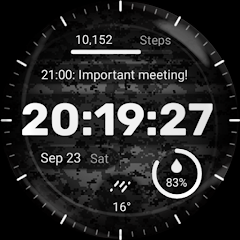
Key features of the Military Watch Face include:
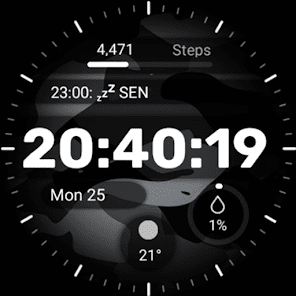
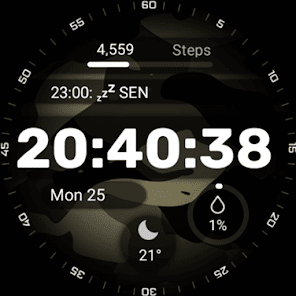
- Camouflage Design: The watch face showcases a range of authentic camouflage patterns, allowing you to express your unique style and appreciation for military-inspired fashion.
- 4x Customizable Complications: Stay informed at a glance with customizable complications that display useful information such as date, weather, steps taken, heart rate, and more. With the Military Watch Face, you can even customize up to three different complications according to your preferences.
Installation Guide: Ensure a smooth setup with this step-by-step guide: Watch [Installation Guide 📣](https://tinyurl.com/4p9rcmww).
Enjoy the specially designed Always On Display ambient mode, conserving power during idle times. Please note that this feature may consume more battery. ⚡
Manual Installation: In case of automatic installation issues, follow these steps:
1. Ensure your watch is connected to Wi-Fi. 📶
2. Visit the Play Store on your watch. 🛒
3. Tap "More on devices" (if available). 📲
4. Click "Install" next to your watch on the list. This will immediately install the watch face. 🔄
5. If you encounter issues, wait for up to 1 hour for the "Install" button to reset. ⏳
- Camouflage Design: The watch face showcases a range of authentic camouflage patterns, allowing you to express your unique style and appreciation for military-inspired fashion.
- 4x Customizable Complications: Stay informed at a glance with customizable complications that display useful information such as date, weather, steps taken, heart rate, and more. With the Military Watch Face, you can even customize up to three different complications according to your preferences.
Installation Guide: Ensure a smooth setup with this step-by-step guide: Watch [Installation Guide 📣](https://tinyurl.com/4p9rcmww).
Enjoy the specially designed Always On Display ambient mode, conserving power during idle times. Please note that this feature may consume more battery. ⚡
Manual Installation: In case of automatic installation issues, follow these steps:
1. Ensure your watch is connected to Wi-Fi. 📶
2. Visit the Play Store on your watch. 🛒
3. Tap "More on devices" (if available). 📲
4. Click "Install" next to your watch on the list. This will immediately install the watch face. 🔄
5. If you encounter issues, wait for up to 1 hour for the "Install" button to reset. ⏳
Updated on
Safety starts with understanding how developers collect and share your data. Data privacy and security practices may vary based on your use, region, and age. The developer provided this information and may update it over time.

No data shared with third parties
Learn more about how developers declare sharing

No data collected
Learn more about how developers declare collection
Ratings and reviews
3.3
154 reviews

Robert Stephens
- Flag inappropriate
- Show review history
October 8, 2025
So overall the watch face works well on my Samsung watch and I'm not having any of the issues other people seem to be having, except for 1. The date, below the time says "Tue Oc...". Literally just that. So I have to use complication 2 for the date as well. I would also like to suggest a blank option on index. (it's a digital face, not analog). And more color options would be nice. Specifically, red, blue and green. I just found one more problem... 12:45am is not 24:45, it's 00:45.
4 people found this review helpful

Duncan Elliott
- Flag inappropriate
February 2, 2026
took my money, and I hit install and it would not let me access it. I tried several times and it was the same every time, glad I only got ripped off for some change!
1 person found this review helpful

Brian Peter
- Flag inappropriate
January 25, 2025
Poorly designed. It doesn't use fixed digit widths, so every second the entire time jumps around on the screen when the seconds change. Very amateur looking.
5 people found this review helpful
Artistry Time Studios
April 27, 2025
Hello Brian, thank you for pointing out the issue with the shifting digits when the seconds change. We apologize that this design flaw led to a poor experience. We appreciate the specific feedback and will take it into account. We will try to update the watch face design to address this in an upcoming release. We're sorry for the frustration caused
What’s new
Fixed font issue. Updated SDK.
App support
About the developer
ANDRZEJ CHMIELEWSKI
Ul. Władysława Korotyńskiego 48-7
02-123 Warszawa
Poland
+48 696 651 962


