

PER23 Digital Watch Face

4.3star
607 reviews
10K+
Downloads

Everyone
info




About this app
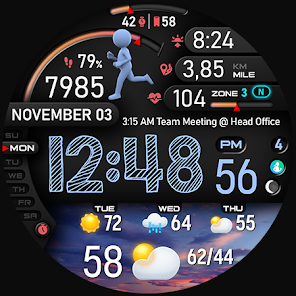
🚀PER23 Digital Watch Face is an advanced digital watch face designed for Wear OS smartwatches. It offers changeable font styles, 3D realistic animated weather, stunning visuals, and forecast weather data.
🏃♂️ Step to See the Dancer!
We designed an interactive watch face to keep you motivated and moving. With every step, watch the runner animation change as you progress toward your goal. Hit 100% of your step goal to see the ultimate dancer animation and celebrate your success!
🎥 Check out the animations in action: https://www.youtube.com/watch?v=MYEzKs-xxAA
🎨 Endless Customization
10 font styles for time
10 backgrounds
10 bar colors
6 sky animations
25 color combinations
6 custom complications
10 AOD Dims
🔹 Key Features of PER23 Digital Watch Face Digital
Weather type and temperature (°F / °C)
High & Low temperature (°F / °C)
Next 3 days' weather type
Next 3 days' temperature (°F / °C)
Steps, daily goal & distance (KM / Miles)
Phone & watch battery level
Active burned calories, floors
Heart rate monitor
UV index, rain possibility
Moon phase, sunset/sunrise
Time zone, barometer
Next appointment reminder
Always-On display with adjustable colors
🛠️ Easy Customization Mode
Simply touch and hold to personalize what data you see — weather, sunrise/sunset, time zone, and more.
🔋 For extra complications and widgets like phone battery, calories, or floors, please check the setup guide here:
👉 https://persona-wf.com/installation/
❓ Weather Not Updating?
Seeing a “❓” icon? That means your watch can’t get weather data. Check your internet connection and refresh the watch face.
🌙 Always-On Display (AOD)
The watch face has an always-active display. You can change the brightness level in the customization menu. There are 10 levels in total.
The colors are synchronized with the normal view.
With the new option “AOD Dim” in the customization menu, you can now change the AOD layout.
🌐 More Details:
https://persona-wf.com/portfolios/platinum/
📖 Installation Guide
Before leaving a review, make sure to check the installation guide and FAQ for a smooth experience:
👉 https://persona-wf.com/installation/
⌚ Supported Devices
Compatible with all Wear OS devices (API Level 34+), including:
SAMSUNG: Galaxy Watch8 Classic, Galaxy Watch Ultra, Watch8, 7, 6, 5, 4
GOOGLE: Pixel Watch 1, 2, 3, 4
FOSSIL: Gen 7, Gen 6, Gen 5e series
MOBVOI: TicWatch Pro 5, Pro 3, E3, C2
🚀 Exceptional Support
Need assistance? We’re here for you
📩 [email protected]
💜 Join Our Community
Get the latest designs & exclusive offers
🌐 https://persona-wf.com
📩 Newsletter
https://persona-wf.com/register
👍 Facebook
https://www.facebook.com/Persona-Watch-Face
📸 Instagram
https://www.instagram.com/persona_watch_face
💬 Telegram
https://t.me/persona_watchface
▶️ YouTube
https://www.youtube.com/c/PersonaWatchFace
💖💖💖 Thank You for Choosing PERSONA!
We hope our design brightens your day and your wrist 😊
Designed with love by Ayla GOKMEN
🏃♂️ Step to See the Dancer!
We designed an interactive watch face to keep you motivated and moving. With every step, watch the runner animation change as you progress toward your goal. Hit 100% of your step goal to see the ultimate dancer animation and celebrate your success!
🎥 Check out the animations in action: https://www.youtube.com/watch?v=MYEzKs-xxAA
🎨 Endless Customization
10 font styles for time
10 backgrounds
10 bar colors
6 sky animations
25 color combinations
6 custom complications
10 AOD Dims
🔹 Key Features of PER23 Digital Watch Face Digital
Weather type and temperature (°F / °C)
High & Low temperature (°F / °C)
Next 3 days' weather type
Next 3 days' temperature (°F / °C)
Steps, daily goal & distance (KM / Miles)
Phone & watch battery level
Active burned calories, floors
Heart rate monitor
UV index, rain possibility
Moon phase, sunset/sunrise
Time zone, barometer
Next appointment reminder
Always-On display with adjustable colors
🛠️ Easy Customization Mode
Simply touch and hold to personalize what data you see — weather, sunrise/sunset, time zone, and more.
🔋 For extra complications and widgets like phone battery, calories, or floors, please check the setup guide here:
👉 https://persona-wf.com/installation/
❓ Weather Not Updating?
Seeing a “❓” icon? That means your watch can’t get weather data. Check your internet connection and refresh the watch face.
🌙 Always-On Display (AOD)
The watch face has an always-active display. You can change the brightness level in the customization menu. There are 10 levels in total.
The colors are synchronized with the normal view.
With the new option “AOD Dim” in the customization menu, you can now change the AOD layout.
🌐 More Details:
https://persona-wf.com/portfolios/platinum/
📖 Installation Guide
Before leaving a review, make sure to check the installation guide and FAQ for a smooth experience:
👉 https://persona-wf.com/installation/
⌚ Supported Devices
Compatible with all Wear OS devices (API Level 34+), including:
SAMSUNG: Galaxy Watch8 Classic, Galaxy Watch Ultra, Watch8, 7, 6, 5, 4
GOOGLE: Pixel Watch 1, 2, 3, 4
FOSSIL: Gen 7, Gen 6, Gen 5e series
MOBVOI: TicWatch Pro 5, Pro 3, E3, C2
🚀 Exceptional Support
Need assistance? We’re here for you
📩 [email protected]
💜 Join Our Community
Get the latest designs & exclusive offers
🌐 https://persona-wf.com
📩 Newsletter
https://persona-wf.com/register
https://www.facebook.com/Persona-Watch-Face
https://www.instagram.com/persona_watch_face
💬 Telegram
https://t.me/persona_watchface
▶️ YouTube
https://www.youtube.com/c/PersonaWatchFace
💖💖💖 Thank You for Choosing PERSONA!
We hope our design brightens your day and your wrist 😊
Designed with love by Ayla GOKMEN
Updated on
Safety starts with understanding how developers collect and share your data. Data privacy and security practices may vary based on your use, region, and age. The developer provided this information and may update it over time.

No data shared with third parties
Learn more about how developers declare sharing

No data collected
Learn more about how developers declare collection
Ratings and reviews
3.7
296 reviews

G. Jornet
- Flag inappropriate
- Show review history
March 3, 2026
Running on the latest Samsung Ultra. Love the design, the display is easy to read, even without my glasses while in bed. I had an issue with setting complications (my fault) and the developer answered back within minutes! With that cleared up, I'll be buying more of his apps.
2 people found this review helpful
PERSONA Watch Face
March 3, 2026
Please try this:
From the main watch screen, press and hold on the display.
Tap “Customize”.
Select the complication area directly and assign the app you want.
On some models and newer One UI versions, changing complications by holding the three dots on the right side may not work due to system behavior changes.

Tony Troman
- Flag inappropriate
March 31, 2026
Been running this watch app now for a few weeks now and I can definitely say this has been one of best app watch faces I have used. Great details and graphics recommend this watch faces to anyone. Easy to download and install and plenty of combinations to use and adjust your watch to how you want it. Overall a great watch app.

Robert Miller
- Flag inappropriate
April 2, 2026
The watch face is nice. No issues downloading or installing on samsung watch 5. Im happy with my purchase
What’s new
• Major update with performance and UI optimizations
• Improved battery efficiency
• Improved readability across all data fields
• New color options and customization enhancements
• Optimized Always-On Display with lower power usage
• Stability and reliability improvements
• Updated to the latest Watch Face Format WFF
• Improved battery efficiency
• Improved readability across all data fields
• New color options and customization enhancements
• Optimized Always-On Display with lower power usage
• Stability and reliability improvements
• Updated to the latest Watch Face Format WFF
App support
About the developer
Ayla Parmakcı
ALACAATLI MAH. SİNPAŞ KMEV. NO:E1 BLK 15/1
06810 MERKEZ ÇANKAYA/Ankara
Türkiye


