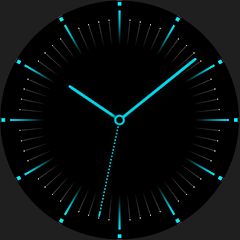
S4U Arctic Blue watch face
4.3star
221 reviews
10K+
Downloads

Everyone
info


About this app
****
⚠️ IMPORTANT: Compatibility
This is a Wear OS Watch Face app and supports only smartwatches running Wear OS 5 or higher (Wear OS API 34+).
Compatible devices include:
- Samsung Galaxy Watch 4, 5, 6, 7, 8 (incl. Ultra and Classic Versions)
- Google Pixel Watch 1–4
- Other Wear OS 5+ smartwatches
If you experience any issues with installation or downloading, even on a compatible smartwatch:
1. Open the companion app provided with your purchase.
2. Follow the steps in the Install/Issues section.
Still need help? Feel free to email me at [email protected] for support.
****
The "S4U Arctic Blue" is a beautiful minimalist dial with the added option of displaying 4 individual complications.
✨ Key Features:
- flat minimal analog watch face
- 14 different colors
- 4 custom complications to show some Data
- 4 custom shortcuts to reach your favorite widget
***
🌙 Always-On Display (AOD)
The S4U Arctic Blue watch face includes an Always-On Display feature for continuous timekeeping. The AOD colors are synchronized with the normal view.
Important Notes:
- Using AOD will reduce battery life, depending on your smartwatch's settings.
- Some smartwatches can dim the AOD display differently based on their own algorithm.
***
🎨 CUSTOMIZATION OPTIONS
Personalize the watch face in just a few steps:
1. Press and hold the watch display.
2. Push the customize button.
3. Swipe left and right between the different customizable objects.
4. Swipe up or down to change the options of the objects.
Available customization options:
+ Hide complications (6styles: show all, hide all, show left and right, show top & left, show right, show all dimmed)
+ Color (14 colors)
+ Index 60min (3 styles: inside, outside, hide)
+ Hands (2styles: short hands, long hands)
+ Complications (4 complications to show some data, 4 custom shortcuts)
Additional functionality:
+ tap the center to show or hide the battery indicator
***
⚙️ COMPLICATIONS & SHORTCUTS
Enhance your watch face with customizable app shortcuts and complications:
- App Shortcuts: Link to your favorite widgets for quick access.
- Editable Complications: Display the data you need most by customizing the visible values.
1. Press and hold the watch display.
2. Push the customize button.
3. Swipe from right to left until you reach the "complications".
4. The possible 8 complications are highlighted. Click on it to set what you want here.
***
📬 Stay Connected
If you enjoy this design, be sure to check out my other creations! I’m constantly working on new watch faces for Wear OS. Visit my website to explore more:
🌐 https://www.s4u-watches.com
Feedback & Support
I’d love to hear your thoughts! Whether it’s something you like, dislike, or a suggestion for future designs, your feedback helps me improve.
📧 For direct support, email me at: [email protected]
💬 Leave a review on the Play Store to share your experience!
Follow Me on Social Media
Stay up to date with my latest designs and updates:
📸 Instagram: https://www.instagram.com/matze_styles4you/
👍 Facebook: https://www.facebook.com/styles4you
▶️ YouTube: https://www.youtube.com/c/styles4you-watches
🐦 X: https://x.com/MStyles4you
⚠️ IMPORTANT: Compatibility
This is a Wear OS Watch Face app and supports only smartwatches running Wear OS 5 or higher (Wear OS API 34+).
Compatible devices include:
- Samsung Galaxy Watch 4, 5, 6, 7, 8 (incl. Ultra and Classic Versions)
- Google Pixel Watch 1–4
- Other Wear OS 5+ smartwatches
If you experience any issues with installation or downloading, even on a compatible smartwatch:
1. Open the companion app provided with your purchase.
2. Follow the steps in the Install/Issues section.
Still need help? Feel free to email me at [email protected] for support.
****
The "S4U Arctic Blue" is a beautiful minimalist dial with the added option of displaying 4 individual complications.
✨ Key Features:
- flat minimal analog watch face
- 14 different colors
- 4 custom complications to show some Data
- 4 custom shortcuts to reach your favorite widget
***
🌙 Always-On Display (AOD)
The S4U Arctic Blue watch face includes an Always-On Display feature for continuous timekeeping. The AOD colors are synchronized with the normal view.
Important Notes:
- Using AOD will reduce battery life, depending on your smartwatch's settings.
- Some smartwatches can dim the AOD display differently based on their own algorithm.
***
🎨 CUSTOMIZATION OPTIONS
Personalize the watch face in just a few steps:
1. Press and hold the watch display.
2. Push the customize button.
3. Swipe left and right between the different customizable objects.
4. Swipe up or down to change the options of the objects.
Available customization options:
+ Hide complications (6styles: show all, hide all, show left and right, show top & left, show right, show all dimmed)
+ Color (14 colors)
+ Index 60min (3 styles: inside, outside, hide)
+ Hands (2styles: short hands, long hands)
+ Complications (4 complications to show some data, 4 custom shortcuts)
Additional functionality:
+ tap the center to show or hide the battery indicator
***
⚙️ COMPLICATIONS & SHORTCUTS
Enhance your watch face with customizable app shortcuts and complications:
- App Shortcuts: Link to your favorite widgets for quick access.
- Editable Complications: Display the data you need most by customizing the visible values.
1. Press and hold the watch display.
2. Push the customize button.
3. Swipe from right to left until you reach the "complications".
4. The possible 8 complications are highlighted. Click on it to set what you want here.
***
📬 Stay Connected
If you enjoy this design, be sure to check out my other creations! I’m constantly working on new watch faces for Wear OS. Visit my website to explore more:
🌐 https://www.s4u-watches.com
Feedback & Support
I’d love to hear your thoughts! Whether it’s something you like, dislike, or a suggestion for future designs, your feedback helps me improve.
📧 For direct support, email me at: [email protected]
💬 Leave a review on the Play Store to share your experience!
Follow Me on Social Media
Stay up to date with my latest designs and updates:
📸 Instagram: https://www.instagram.com/matze_styles4you/
👍 Facebook: https://www.facebook.com/styles4you
▶️ YouTube: https://www.youtube.com/c/styles4you-watches
🐦 X: https://x.com/MStyles4you
Updated on
Safety starts with understanding how developers collect and share your data. Data privacy and security practices may vary based on your use, region, and age. The developer provided this information and may update it over time.

No data shared with third parties
Learn more about how developers declare sharing

This app may collect these data types
App info and performance

Data is encrypted in transit

Data can’t be deleted
Ratings and reviews
3.9
83 reviews

Graham Owens
- Flag inappropriate
- Show review history
November 12, 2025
Very nice clean watch face .... thank you folks My OnePlus Watch 3 running WearOS5 was bitching about it being incompatible, but a clicked on and it's been fine.
styles4you
November 12, 2025
You are welcome 🤗 and thank you very much for your rating 🙂
Update: 😱 It did say "incompatible"!?
Do you get the message also with my other watch faces? Normally all my watch faces are compatible with Wear OS 5. 🤔

Arturo M.
- Flag inappropriate
September 11, 2024
Great, but there is space for improvement. I would love more options for the clock hands, and also I would like to have the option to just have the month and the date number. There is no need to have the day, especially when I can't see the date. Perhaps also more options for the clock's analog dial
1 person found this review helpful

Neilor Holanda
- Flag inappropriate
- Show review history
February 18, 2026
Absolutely gorgeous. it's a perfect match to Galaxy Watch Ultra blue!
styles4you
February 18, 2026
I'm glad to hear that. Thank you very much for your review. 🙂
What’s new
Version (1.1.1) - Watch Face
In order to comply with Google policy, older versions with API 30 (Wear OS 3) or lower have been removed.
New customization option:
- AOD Layout (default or pure analog)
In order to comply with Google policy, older versions with API 30 (Wear OS 3) or lower have been removed.
New customization option:
- AOD Layout (default or pure analog)
App support
About the developer


