Futuristic GUI Watch Face
Contains adsIn-app purchases

4.4star
2.46K reviews
100K+
Downloads

Everyone
info


About this app
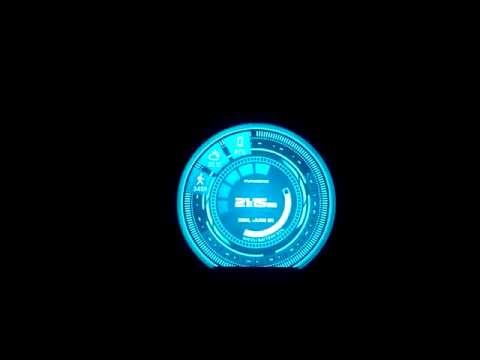
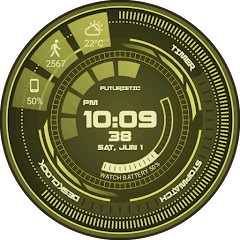
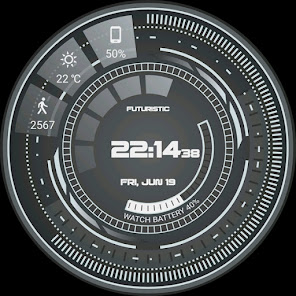
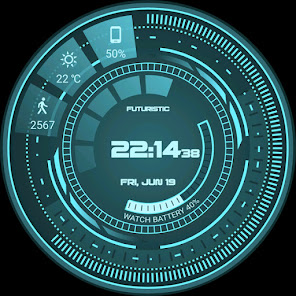
Futuristic GUI Watch Face for Wear OS!
★ Features of Futuristic GUI Watch Face ★
- Circular animation in interactive mode
- Choose design colors
- Day & Month
- Watch battery
- Weather (requires phone app)
The settings of the watch face are located in the "Wear OS" app of your mobile.
Just hit the gear icon over the watch face preview and the settings screen will show up!
★ FREE Settings ★
🔸Wear OS 2.X / 3.X / 4.X
- Choose design colors on watch & mobile
- Enable animation in interactive mode
- Define heartbeat frequency refresh rate
- Define weather refresh rate
- Weather unit
- 12 / 24 hours mode
- Define interactive mode duration
- Choose small/big clock
- Choose to display a leading zero on hours
🔸Wear OS 6.X
- Choose design colors
- Choose date format
- Display shortcuts or not
- Display watch battery indicators or not
- ... and more
★ PREMIUM Settings ★
🔸Wear OS 2.X / 3.X / 4.X
- Choose your own title in place of "FUTURISTIC"
- Switch between éco / simple b&w / full ambient mode
- Data:
+ Change the indicator to display on the 3 positions
+ Choose between up to 8 indicators (Daily step count, Heartbeat frequency, Unread Email from Gmail, etc...)
+ Complication (wear 2.0 & 3.0)
- Interactivity
+ Access to detailed data by touching a widget
+ Switch the displayed data by touching a widget
+ Change the shortcut to execute on the 3 positions
+ Choose your shortcut among all applications installed on your watch!
+ Choose to display the interactive areas
🔸Wear OS 6.X
- Futuristic animations
- Complication data:
+ Set the data you want on the widgets
+ Touch the widgets to start the data activity if available
- Interactivity
+ Access to detailed data by touching a widget
+ Modify the shortcuts: choose your shortcut among all applications installed on your watch!
★ Additional features on phone ★
- Notifications for new designs
- Access to support
- ... and more
★ Installation ★
🔸Wear OS 2.X / 3.X / 4.X
A notification will be displayed on your watch, right after your mobile installation. You just have to hit it to start the installation process of the watch face.
If the notification did not display for some reason, you can still install the watch face by using the Google Play Store available on your watch: just search the watch face by its name.
🔸Wear OS 6.X
Install the watch app to manage the watchface: the free version is automatically installed. Then use the "MANAGE" button in the top right shortcut of the watchface to update/upgrade your watch face.
★ More watch faces ★
Visit my watch faces collection for Wear OS on the Play Store at https://goo.gl/CRzXbS
** If you have any issues or questions, feel free to contact me by email (English or French language) before giving a bad rating. Thanks!
Website: https://www.themaapps.com/
Youtube: https://youtube.com/ThomasHemetri
Twitter: https://x.com/ThomasHemetri
Instagram: https://www.instagram.com/thema_watchfaces
★ Features of Futuristic GUI Watch Face ★
- Circular animation in interactive mode
- Choose design colors
- Day & Month
- Watch battery
- Weather (requires phone app)
The settings of the watch face are located in the "Wear OS" app of your mobile.
Just hit the gear icon over the watch face preview and the settings screen will show up!
★ FREE Settings ★
🔸Wear OS 2.X / 3.X / 4.X
- Choose design colors on watch & mobile
- Enable animation in interactive mode
- Define heartbeat frequency refresh rate
- Define weather refresh rate
- Weather unit
- 12 / 24 hours mode
- Define interactive mode duration
- Choose small/big clock
- Choose to display a leading zero on hours
🔸Wear OS 6.X
- Choose design colors
- Choose date format
- Display shortcuts or not
- Display watch battery indicators or not
- ... and more
★ PREMIUM Settings ★
🔸Wear OS 2.X / 3.X / 4.X
- Choose your own title in place of "FUTURISTIC"
- Switch between éco / simple b&w / full ambient mode
- Data:
+ Change the indicator to display on the 3 positions
+ Choose between up to 8 indicators (Daily step count, Heartbeat frequency, Unread Email from Gmail, etc...)
+ Complication (wear 2.0 & 3.0)
- Interactivity
+ Access to detailed data by touching a widget
+ Switch the displayed data by touching a widget
+ Change the shortcut to execute on the 3 positions
+ Choose your shortcut among all applications installed on your watch!
+ Choose to display the interactive areas
🔸Wear OS 6.X
- Futuristic animations
- Complication data:
+ Set the data you want on the widgets
+ Touch the widgets to start the data activity if available
- Interactivity
+ Access to detailed data by touching a widget
+ Modify the shortcuts: choose your shortcut among all applications installed on your watch!
★ Additional features on phone ★
- Notifications for new designs
- Access to support
- ... and more
★ Installation ★
🔸Wear OS 2.X / 3.X / 4.X
A notification will be displayed on your watch, right after your mobile installation. You just have to hit it to start the installation process of the watch face.
If the notification did not display for some reason, you can still install the watch face by using the Google Play Store available on your watch: just search the watch face by its name.
🔸Wear OS 6.X
Install the watch app to manage the watchface: the free version is automatically installed. Then use the "MANAGE" button in the top right shortcut of the watchface to update/upgrade your watch face.
★ More watch faces ★
Visit my watch faces collection for Wear OS on the Play Store at https://goo.gl/CRzXbS
** If you have any issues or questions, feel free to contact me by email (English or French language) before giving a bad rating. Thanks!
Website: https://www.themaapps.com/
Youtube: https://youtube.com/ThomasHemetri
Twitter: https://x.com/ThomasHemetri
Instagram: https://www.instagram.com/thema_watchfaces
Updated on
Safety starts with understanding how developers collect and share your data. Data privacy and security practices may vary based on your use, region, and age. The developer provided this information and may update it over time.

No data shared with third parties
Learn more about how developers declare sharing

This app may collect these data types
App activity and App info and performance

Data is encrypted in transit

Data can’t be deleted
Ratings and reviews
4.4
2.23K reviews

GXJ5
- Flag inappropriate
November 23, 2024
Just OK. The Good: great looks, and decent but highly restricted functionality. The Inexcusable: Putting default complications behind a pay wall. If you want to use the default Samsung complications (or any) like step tracking, messages, media controls, you cannot without paying for premium. Looks better than the default watchface, but is less useful than what you get built in from the manufacturer.
2 people found this review helpful
thema
November 23, 2024
The watch face can be used without payment, but everything can not be free. There are a lot of features available for free. If it was a paid app, you would have nothing for free. The main purpose of the free app is to try the design and see if you like it. There is a lot of work behind the app, and obviously in life we need to get paid a bit ;)

Greg Stevens
- Flag inappropriate
March 7, 2023
This watchface does a good job of illustrating the best of Thema's offerings: a modern face with numerous moving parts that all come together. The fast animation setting is easily the best choice. I just wish the time could be a little bigger, as well as the text right above - English is nearly unreadable, but Japanese kana works nicely.
3 people found this review helpful

Drew Dehel
- Flag inappropriate
- Show review history
March 22, 2025
Unique style, feels futuristic; default even says Futuristic on watch face, text can be customized. I bought premium, wasn't too expensive. disappointed to discover it didn't give any more color control over any elements except the main color; everything stays just one tone. PLEASE add detail color customization for personalization, like Core. more interesting if more of the screen elements were displaying data like it's battery bar. blood oxygen won't display numbers, Samsung US approval issue?
What’s new
2.26.01.0419
- Design and optimisations
- Bump libraries versions
- Fix crash
Requires app update on both Watch & Mobile.
If you have any issue, please let me know by email at [email protected]
- Design and optimisations
- Bump libraries versions
- Fix crash
Requires app update on both Watch & Mobile.
If you have any issue, please let me know by email at [email protected]
App support
About the developer


