
Passport Photo & IDPhoto Maker
Contains adsIn-app purchases
4.5star
8.07K reviews
1M+
Downloads

Everyone
info


About this app
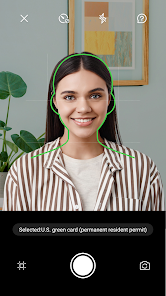
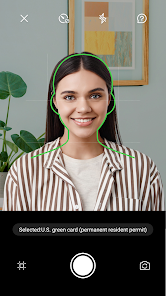
Easily create ID Photo and Passport photo data by capturing photos or selecting from the existing gallery using this app(Passport Photo & ID Photo Maker). Conveniently save individual photo data for future use.
The feature allowing unlimited retakes makes it ideal for capturing children's ID photos effortlessly. This app(Passport Photo & ID Photo Maker) generates photo data tailored to the standard 4x6 print size (101.6mm x 152.4mm), enabling easy printing at home using printers compatible with smartphone or digital camera photo files (JPEG format).
Main Features:
Powered Technology
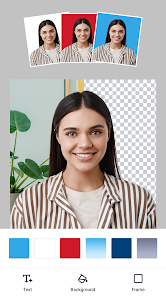
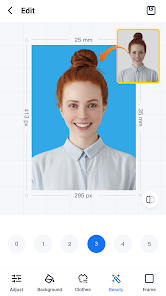
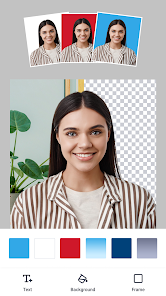
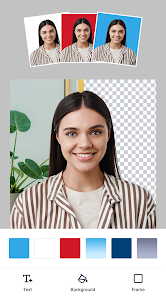
The ID photo maker utilizes advanced algorithms to ensure your passport photos meet official requirements. It automatically adjusts your image, resizing it to the correct dimensions, removing the background, and enhancing image quality.
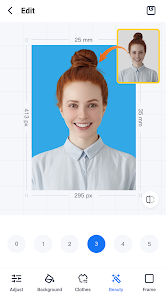
Custom Background Color Support
Choose your preferred background color to personalize your photos with a full range of custom color options.
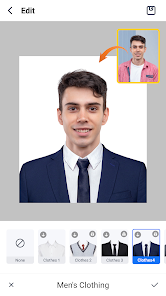
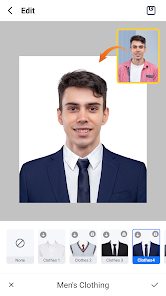
Formal Suit Change Support
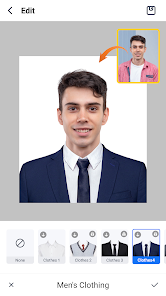
Access a variety of formal suits for women, men, and kids with the suit changer feature, ideal for passport or ID photos.
Custom Photo Size Support
You can customize the size of the ID photo from a range of options, including:
- 51mm x 51mm (2 x 2 inches)
- 25mm x 25mm (1 x 1 inches)
- 45mm x 35mm
- 50mm x 35mm (2 inches)
- 48mm x 33mm
- 35mm x 25mm (1 inch)
- 45mm x 45mm
- 40mm x 30mm
Additionally, you can specify other sizes with different height and width dimensions as needed.
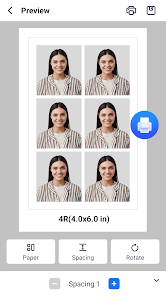
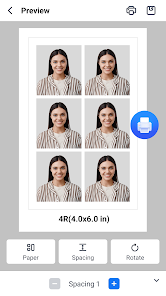
ID Photo Print Template Support
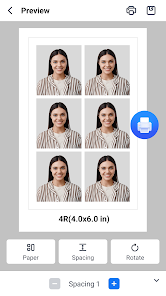
Generate print templates compatible with the standard print sizes of ID photos. You can easily print photos at home using a printer that supports smartphone or digital camera photo files, as the created format matches that of most smartphones and digital cameras (JPEG, PNG, WEBP).
- 3R(3.5 x 5 inches)
- 4R(4.0 x 6.0 inches)
- 5R(5.0 x 7.0 inches)
- 6R(6.0 x 8.0 inches)
- 8R(8.0 x 10.0 inches)
- 8R+(8.0 x 12.0 inches)
- 10R(10.0 x 12.0 inches)
- A4(210 x 297 mm)
Though the default finished print size is 4x6 (101.6mm x 152.4mm), you have the flexibility to adjust the size as needed.
You can customize the number of cropped ID photos to be placed on a single photo print, allowing for various sizes to be included on one print.
Permissions Used by Passport Photo & ID Photo Maker:
・Camera (For taking ID photos)
・Storage (For saving ID photos)
The feature allowing unlimited retakes makes it ideal for capturing children's ID photos effortlessly. This app(Passport Photo & ID Photo Maker) generates photo data tailored to the standard 4x6 print size (101.6mm x 152.4mm), enabling easy printing at home using printers compatible with smartphone or digital camera photo files (JPEG format).
Main Features:
Powered Technology
The ID photo maker utilizes advanced algorithms to ensure your passport photos meet official requirements. It automatically adjusts your image, resizing it to the correct dimensions, removing the background, and enhancing image quality.
Custom Background Color Support
Choose your preferred background color to personalize your photos with a full range of custom color options.
Formal Suit Change Support
Access a variety of formal suits for women, men, and kids with the suit changer feature, ideal for passport or ID photos.
Custom Photo Size Support
You can customize the size of the ID photo from a range of options, including:
- 51mm x 51mm (2 x 2 inches)
- 25mm x 25mm (1 x 1 inches)
- 45mm x 35mm
- 50mm x 35mm (2 inches)
- 48mm x 33mm
- 35mm x 25mm (1 inch)
- 45mm x 45mm
- 40mm x 30mm
Additionally, you can specify other sizes with different height and width dimensions as needed.
ID Photo Print Template Support
Generate print templates compatible with the standard print sizes of ID photos. You can easily print photos at home using a printer that supports smartphone or digital camera photo files, as the created format matches that of most smartphones and digital cameras (JPEG, PNG, WEBP).
- 3R(3.5 x 5 inches)
- 4R(4.0 x 6.0 inches)
- 5R(5.0 x 7.0 inches)
- 6R(6.0 x 8.0 inches)
- 8R(8.0 x 10.0 inches)
- 8R+(8.0 x 12.0 inches)
- 10R(10.0 x 12.0 inches)
- A4(210 x 297 mm)
Though the default finished print size is 4x6 (101.6mm x 152.4mm), you have the flexibility to adjust the size as needed.
You can customize the number of cropped ID photos to be placed on a single photo print, allowing for various sizes to be included on one print.
Permissions Used by Passport Photo & ID Photo Maker:
・Camera (For taking ID photos)
・Storage (For saving ID photos)
Updated on
Safety starts with understanding how developers collect and share your data. Data privacy and security practices may vary based on your use, region, and age. The developer provided this information and may update it over time.


Ratings and reviews
4.5
7.98K reviews

John Broglio
- Flag inappropriate
December 22, 2025
yes, you have to figure out what is ads and what is app, but after struggling for an hour to produce a usable passport picture, I was able to take one of my efforts, submit it to the app, and then to the online passport application. A craziness of ads, but they erased the background texture and fixed the size in a minute or two. I had already taken and cropped a picture, but the white background had panel lines in it and shadow -- unacceptable. this app fixed everything!
12 people found this review helpful

Joe Beer
- Flag inappropriate
December 14, 2025
Seems to work quite well. it lets me take a photo and email it to myself without charging; just what I needed. Per other reviewers they seemed to have fixed the ads issue and ads do not totally block the screen , though you do have to close them to continue
10 people found this review helpful

Ardo Kusuma
- Flag inappropriate
March 21, 2026
Don't understand how the app works. Took a pic, hit next, then picture just becomes a black blob. I thought it was a bug for Schengen Visa, but tried US passport, and still giving me black blob.
2 people found this review helpful
What’s new
* Optimize user experience
App support
About the developer


