
ibis Paint
In-app purchases

4.5star
10.8K reviews
100K+
Downloads

Everyone
info






About this app
This app is an ad-removed version of ibisPaint X. An additional in-app purchase for Premium Membership is required to unlock all features, in which case it is cheaper to download ibisPaint X and purchase the Premium Membership there instead.
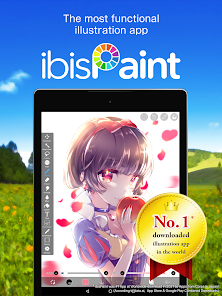
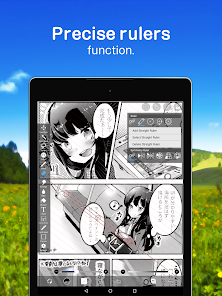
ibis Paint is a popular and versatile drawing app downloaded more than 500 million times in total as a series, which provides over 47000 brushes, over 27000 materials, over 2100 fonts, 84 filters, 46 screentones, 27 blending modes, recording drawing processes, stroke stabilization feature, various ruler features such as radial line rulers or symmetry rulers, and clipping mask features.
*YouTube channel
Many tutorial videos on ibis Paint are uploaded to our YouTube channel.
Subscribe it!
https://youtube.com/ibisPaint
*Features
ibis Paint has high functionality as a drawing app along with features of sharing drawing processes with other users.
[Brush Features]
- Smooth drawing at up to 60 fps.
- Over 47000 kinds of brushes including dip pens, felt tip pens, digital pens, air brushes, fan brushes, flat brushes, pencils, oil brushes, charcoal brushes, crayons and stamps.
[Layer Features]
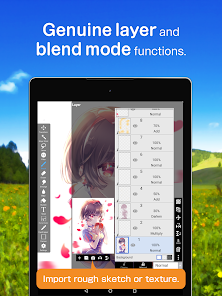
- You can add layers as many as you need with no limit.
- Layer parameters that can be set to each layers individually such as layer opacity, alpha blending, adding, subtracting, and multiplying.
- A handy clipping feature for clipping images, etc.
- Various layer commands such as layer duplication, import from the photo library, horizontal inversion, vertical inversion, layer rotation, layer moving, and zooming in/out.
- A feature for setting layer names to distinguish different layers.
[Manga Features]
- Advanced text tool function featuring Vertical, Horizontal, Stroke, Font select, and Multiple text functions.
*About ibis Paint purchase plan
The following purchase plans are available for ibis Paint:
- ibis Paint X (free version)
- ibis Paint (paid version)
- Ad Removal Upgrade
- Premium Membership (Monthly plan / Yearly plan)
There is no difference in features other than the presence or absence of advertisements for the paid version and the free version.
If you purchase the Ad Removal Upgrade, the ads will not be displayed and there will be no difference from the paid version of ibis Paint.
In order to use more advanced functions, the following Premium Membership (Monthly plan / Yearly plan) contracts are required.
[Premium Membership]
A premium member can use the premium features. Only for the initial time you can use the 7 days or the 30 days free trial. Premium membership entitles you to the following features.
- 20GB of cloud storage capacity
- Vector tool(*1)
- Premium Materials
- Premium Canvas Papers
- Premium Fonts
- Tone Curve filter
- Gradation Map filter
- Levels Adjustment filter
- Premium Adjustment Layers
- Surrounding Fill・Surrounding Eraser
- AI Disturbance
- Artwork folder feature
- Import original brush patterns
- Remove watermark from videos
- Plus many other features exclusive to Premium Membership!
(*1) You can try it for free for up to 1 hour per day.
* After you become a Premium Membership with a free trial, renewal fee will be charged automatically unless you cancel your Premium Membership at least 24 hours before the end of the free trial period.
* We will add premium features in future, please look out for them.
*On Data Collection
- Only when you are using or going to use SonarPen, the app collects audio signal from microphone. The collected data is only used for communication with SonarPen, and is never saved nor sent to anywhere.
*Questions and support
Questions and bug reports in reviews will not be responded to, so please contact ibis Paint support.
https://ssl.ibis.ne.jp/en/support/Entry?svid=25
*ibisPaint's terms of service
https://ibispaint.com/agreement.jsp
ibis Paint is a popular and versatile drawing app downloaded more than 500 million times in total as a series, which provides over 47000 brushes, over 27000 materials, over 2100 fonts, 84 filters, 46 screentones, 27 blending modes, recording drawing processes, stroke stabilization feature, various ruler features such as radial line rulers or symmetry rulers, and clipping mask features.
*YouTube channel
Many tutorial videos on ibis Paint are uploaded to our YouTube channel.
Subscribe it!
https://youtube.com/ibisPaint
*Features
ibis Paint has high functionality as a drawing app along with features of sharing drawing processes with other users.
[Brush Features]
- Smooth drawing at up to 60 fps.
- Over 47000 kinds of brushes including dip pens, felt tip pens, digital pens, air brushes, fan brushes, flat brushes, pencils, oil brushes, charcoal brushes, crayons and stamps.
[Layer Features]
- You can add layers as many as you need with no limit.
- Layer parameters that can be set to each layers individually such as layer opacity, alpha blending, adding, subtracting, and multiplying.
- A handy clipping feature for clipping images, etc.
- Various layer commands such as layer duplication, import from the photo library, horizontal inversion, vertical inversion, layer rotation, layer moving, and zooming in/out.
- A feature for setting layer names to distinguish different layers.
[Manga Features]
- Advanced text tool function featuring Vertical, Horizontal, Stroke, Font select, and Multiple text functions.
*About ibis Paint purchase plan
The following purchase plans are available for ibis Paint:
- ibis Paint X (free version)
- ibis Paint (paid version)
- Ad Removal Upgrade
- Premium Membership (Monthly plan / Yearly plan)
There is no difference in features other than the presence or absence of advertisements for the paid version and the free version.
If you purchase the Ad Removal Upgrade, the ads will not be displayed and there will be no difference from the paid version of ibis Paint.
In order to use more advanced functions, the following Premium Membership (Monthly plan / Yearly plan) contracts are required.
[Premium Membership]
A premium member can use the premium features. Only for the initial time you can use the 7 days or the 30 days free trial. Premium membership entitles you to the following features.
- 20GB of cloud storage capacity
- Vector tool(*1)
- Premium Materials
- Premium Canvas Papers
- Premium Fonts
- Tone Curve filter
- Gradation Map filter
- Levels Adjustment filter
- Premium Adjustment Layers
- Surrounding Fill・Surrounding Eraser
- AI Disturbance
- Artwork folder feature
- Import original brush patterns
- Remove watermark from videos
- Plus many other features exclusive to Premium Membership!
(*1) You can try it for free for up to 1 hour per day.
* After you become a Premium Membership with a free trial, renewal fee will be charged automatically unless you cancel your Premium Membership at least 24 hours before the end of the free trial period.
* We will add premium features in future, please look out for them.
*On Data Collection
- Only when you are using or going to use SonarPen, the app collects audio signal from microphone. The collected data is only used for communication with SonarPen, and is never saved nor sent to anywhere.
*Questions and support
Questions and bug reports in reviews will not be responded to, so please contact ibis Paint support.
https://ssl.ibis.ne.jp/en/support/Entry?svid=25
*ibisPaint's terms of service
https://ibispaint.com/agreement.jsp
Updated on
Safety starts with understanding how developers collect and share your data. Data privacy and security practices may vary based on your use, region, and age. The developer provided this information and may update it over time.

No data shared with third parties
Learn more about how developers declare sharing

This app may collect these data types
Location, Personal info and 5 others

Data is encrypted in transit

You can request that data be deleted
Ratings and reviews
4.5
6.9K reviews

Delicious_Delusions (Hungy)
- Flag inappropriate
March 2, 2026
Bought it thinking; Surely the complete version would come with all the features, right? No, no it does not. God forbid you pay for something and it has the features unlocked. With this version you only get the brushes, things like tools are still locked. Stick with the X version, at least that's free.
10 people found this review helpful

camii
- Flag inappropriate
- Show review history
July 3, 2020
It's great! However, this may just be me but I would expect everything else to be unlocked after I payed 8 dollar (+tax). As far as I know, you only unlock the brushes and that's it. For 8 dollars? Eh, probably not worth it I should have just stuck with the Ibispaint X and get the brushes for free just by watching an ad. Why spend 8 dollars on something that I can literally get for free?
605 people found this review helpful

Kellianne Kernell
- Flag inappropriate
September 2, 2024
It's good, I've been using Ibispaint for years and even had a subscription for a time till getting the paid version. My only complaint about the app is being able to select certain artworks (more than 1) and share them with PS, CSP, or other art programs all at once. It'll make life easier to do and not too much of a hassle to share 1 artwork to CSP cloud, wait, share, wait, and so on. If this were a feature, I'll use it more.
161 people found this review helpful
What’s new
[New Features]
- You can now create and name multiple color palettes for easier management.
- Added a feature to share color palettes via QR code.
- Brushes in the "Basic" tab of the Brush window are now organized by category.
- Added support for selecting CMYK colors when saving artwork as a JPEG or flattened layer PSD file.
etc.
For more details, see: https://ibispaint.com/historyAndRights.jsp?newsID=256373832
- You can now create and name multiple color palettes for easier management.
- Added a feature to share color palettes via QR code.
- Brushes in the "Basic" tab of the Brush window are now organized by category.
- Added support for selecting CMYK colors when saving artwork as a JPEG or flattened layer PSD file.
etc.
For more details, see: https://ibispaint.com/historyAndRights.jsp?newsID=256373832
App support
About the developer
株式会社アイビス
1-5-1, HATCHOBORI
ORIX YAESU DORI BLDG. 2F.
CHUO-KU, 東京都 104-0032
Japan
+81 52-587-5072


