
Signia App
2.8star
32.7K reviews

Everyone
info
1M+
Downloads

Everyone
Learn more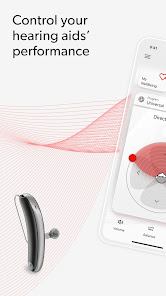


About this app
Let the easy-to-use Signia app empower you on your hearing journey:
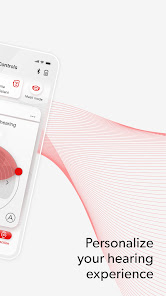
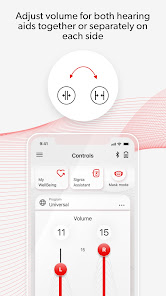
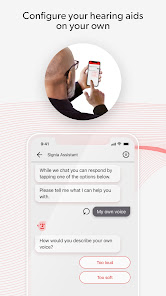
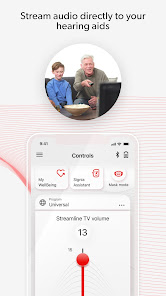
• Be in control – Adjust the volume via remote control and tailor settings to your personal preferences with the Signia Assistant*.
• Be confident – Connect with your hearing professional via TeleCare* and rely on quick answers in easy how-to videos.
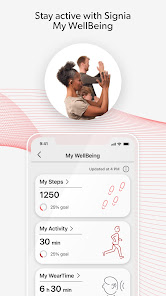
• Be healthy – Keep track of your physical fitness and hearing activity with My WellBeing*.
*feature availability may vary according to e.g. hearing aid model, firmware version and TeleCare availability in your country.
The user guide for the app can be accessed from the app settings menu. Alternatively, you can download the user guide in electronic form from www.wsaud.com or order a printed version from the same address. The printed version will be made available to you free of charge within 7 working days.
Manufactured by
WSAUD A/S
Nymøllevej 6
3540 Lynge
Denmark
UDI-DI (01)05714880113167
PLEASE READ THE USER GUIDE OF YOUR HEARING AIDS BEFORE USING THIS APP.
• Be in control – Adjust the volume via remote control and tailor settings to your personal preferences with the Signia Assistant*.
• Be confident – Connect with your hearing professional via TeleCare* and rely on quick answers in easy how-to videos.
• Be healthy – Keep track of your physical fitness and hearing activity with My WellBeing*.
*feature availability may vary according to e.g. hearing aid model, firmware version and TeleCare availability in your country.
The user guide for the app can be accessed from the app settings menu. Alternatively, you can download the user guide in electronic form from www.wsaud.com or order a printed version from the same address. The printed version will be made available to you free of charge within 7 working days.
Manufactured by
WSAUD A/S
Nymøllevej 6
3540 Lynge
Denmark
UDI-DI (01)05714880113167
PLEASE READ THE USER GUIDE OF YOUR HEARING AIDS BEFORE USING THIS APP.
Updated on
Safety starts with understanding how developers collect and share your data. Data privacy and security practices may vary based on your use, region, and age. The developer provided this information and may update it over time.


Ratings and reviews
2.8
32.3K reviews

Leisa Jones
- Flag inappropriate
- Show review history
April 6, 2026
Update- Bluetooth drops constantly. i have to take the time to fix it several times (6+) each day by turning my bluetooth completely off and back on, with my aids working thru my phone the whole time. Sometimes get messages that my phone volume is too low or my aids aren't connected to my phone when they actually are and the app can't connect to my aids. When that happens, I have to stop & reboot my phone to get the app to connect. Please fix this & make it a better fit for Android users.
1 person found this review helpful
Sivantos Pte. Ltd.
April 6, 2026
We apologize for the frequent disconnects. If you notice the app is Disconnected, tap on the BT symbol at the top right of the app. Next, return back to the main remote control screen and the app should refresh it's search for the aids. Alternatively, go to Settings > Stop the app. Afterwards, reopen the app and check the connection.

Karen Toman
- Flag inappropriate
- Show review history
April 8, 2026
app constantly crashing, Bluetooth doesn't work half the time. Here we are, months later. At least once a month I unpair the hearing aids, repair, and still, it is a struggle. The app is the only way to control volume, direction, etc. I will not ever get another pair of signia hearing aids, unless these issues with the app are resolved.
1 person found this review helpful
Sivantos Pte. Ltd.
June 10, 2025
Hello, we have received reports of some users having UI issues after updating the app. If you haven't already, please delete & reinstall the app and set it up with the hearing aids again to start fresh. If you have further issues, you can contact our support group here: https://www.signia.net/en-us/local/en-us/signia-app-store-review/

Marcia Reaver
- Flag inappropriate
- Show review history
February 10, 2026
Just another day that ends in Y. Since the most recent update, my hearing aids are not automatically pairing with my Bluetooth. Prior to that, the late November update stop connecting the hearing aids to the app. The only solution is to delete the app and reinstall it. then I need to run through the setup again before I'm actually connected to the app. I drove 30 minutes to my audiologist's office to see if there's something wrong that they could fix. They told me it was the app.
24 people found this review helpful
Sivantos Pte. Ltd.
February 26, 2026
We apologize for the inconsistent performance. We can try a full unpairing/repairing by following the steps on the Connectivity & pairing page at signia.net/support. If you'd like to work with our end user support team, their contact information can also be found on that landing page. We hope to improve the functionality in future versions.
What’s new
Performance Improvements and Bug Fixes
Everyone
Learn moreApp support
About the developer
SIVANTOS PTE. LTD.
18 Tai Seng Street #08-08 18 Tai Seng
Singapore 539775
+91 90609 28886


