
Signia App
2.8star
32.5K reviews
1M+
Downloads

Everyone
info


About this app
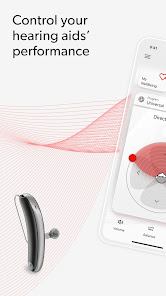
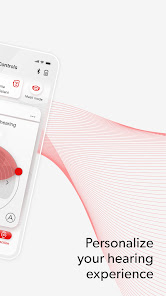
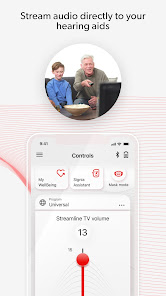
Let the easy-to-use Signia app empower you on your hearing journey:
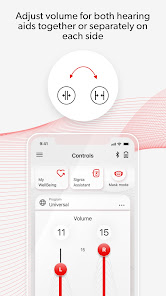
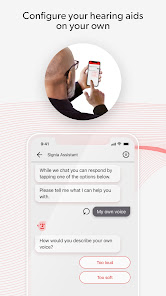
• Be in control – Adjust the volume via remote control and tailor settings to your personal preferences with the Signia Assistant*.
• Be confident – Connect with your hearing professional via TeleCare* and rely on quick answers in easy how-to videos.
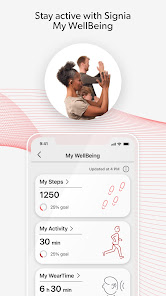
• Be healthy – Keep track of your physical fitness and hearing activity with My WellBeing*.
*feature availability may vary according to e.g. hearing aid model, firmware version and TeleCare availability in your country.
The user guide for the app can be accessed from the app settings menu. Alternatively, you can download the user guide in electronic form from www.wsaud.com or order a printed version from the same address. The printed version will be made available to you free of charge within 7 working days.
Manufactured by
WSAUD A/S
Nymøllevej 6
3540 Lynge
Denmark
UDI-DI (01)05714880113167
PLEASE READ THE USER GUIDE OF YOUR HEARING AIDS BEFORE USING THIS APP.
• Be in control – Adjust the volume via remote control and tailor settings to your personal preferences with the Signia Assistant*.
• Be confident – Connect with your hearing professional via TeleCare* and rely on quick answers in easy how-to videos.
• Be healthy – Keep track of your physical fitness and hearing activity with My WellBeing*.
*feature availability may vary according to e.g. hearing aid model, firmware version and TeleCare availability in your country.
The user guide for the app can be accessed from the app settings menu. Alternatively, you can download the user guide in electronic form from www.wsaud.com or order a printed version from the same address. The printed version will be made available to you free of charge within 7 working days.
Manufactured by
WSAUD A/S
Nymøllevej 6
3540 Lynge
Denmark
UDI-DI (01)05714880113167
PLEASE READ THE USER GUIDE OF YOUR HEARING AIDS BEFORE USING THIS APP.
Updated on
Safety starts with understanding how developers collect and share your data. Data privacy and security practices may vary based on your use, region, and age. The developer provided this information and may update it over time.


Ratings and reviews
2.8
32.1K reviews

Linda Winter
- Flag inappropriate
February 24, 2026
I love this app until today when I can no longer split the sound volume between the right and left hearing aids. up until today. that was something I could always do. AI told me to go to the three bar, menu app settings, slide selection but that selection appears to no longer be there. if insignia being bought out by the other company is the cause of this, I wish the new company would wake up and restore that capability in the app as I use it. Only reason I've downgraded app to 4 stars
11 people found this review helpful
Sivantos Pte. Ltd.
February 24, 2026
Hi Linda. Typically, if the option to split the volume sliders is missing, that means the Bluetooth connection between the app and hearing aids is disconnected. You can try to go to the 3 lines > Settings > Stop the app. Afterwards, reopen it and see if the connection is established.

LINDA
- Flag inappropriate
- Show review history
March 31, 2026
Still learning! I like being able to check for battery strength, adjust sound in different settings, and focus sound reception ci duection. In some settings I need to turn all attention to hearing a person in front of me, and not so much picking up sounds behind me: The app allows me to adjust that. On other occasions(e.g. driving) I want to be sure I can hear emergency vehicles approaching from all directions.

jim s
- Flag inappropriate
- Show review history
April 1, 2026
The Bluetooth is not totally reliable. turns off randomly. Sometimes when going to well-being the app just freezes. I paid $3,500 for the hearng aid and you guys can't even get a simple thing like Bluetooth to work with your app. The app crashes a lot of the time now. And now I cannot control the volume or the balance controls they just do nothing. you need to hire some new programmers or something because this app really really sucks
2 people found this review helpful
Sivantos Pte. Ltd.
February 24, 2026
We are sorry that the Bluetooth connectivity is not consistent. If you notice that the app is frozen, you can try going into the phone's Settings > Apps > Signia App > Force stop. Afterwards, reopen the app to see if functionality returns. We continue to improve the app's reliability when it comes to maintaining Bluetooth connectivity.
What’s new
Performance Improvements and Bug Fixes
App support
About the developer
SIVANTOS PTE. LTD.
18 Tai Seng Street #08-08 18 Tai Seng
Singapore 539775
+91 90609 28886


